Below are the criteria uses to evaluate and compare antivirus software:
1.Scope of Protection
2.Effectiveness
3.Ease of Installation and Setup
4.Features
5.Updates
6.Help & Support
Showing posts with label Antivirus. Show all posts
Showing posts with label Antivirus. Show all posts
Friday, 2 April 2010

Monday, 28 December 2009
5 biggest data disaster in 2009
If there was anything even vaguely comforting about the data breaches that were announced this year, it was that many of them stemmed fsecurity Artwork: Chip Taylor rom familiar and downright mundane security failures.
Companies continued to be felled more by usual issues such as lost laptops, unpatched or poorly coded software, inadvertent disclosures and rogue insiders, rather than by sneaky new attack techniques or devastating new hacker tools.
Here's a look back at five of the more notable breaches of the year:
1. TSA: Lessons in Redaction
In what must arguably rank as one of the biggest security gaffes of this year, the Transportation Security Administration (TSA) accidentally posted on a public Web site a manual that contained complete details on its airport screening procedures.
The TSA manual included details for screening passengers, checking for explosives devices, special rules for handling the CIA, diplomats and law enforcement officials, and the technical settings and tolerances used by metal and explosive detectors used at airports.
The leak occurred when an improperly redacted TSA Standard Operations Procedures manual was posted on a federal Web site as part of a a contract bid solicitation process. Lawmakers called the gaffe "shocking" and "reckless," as wells as a threat to national security.
2. Heartland Payment Systems: Breach Poster Child
Heartland makes the list simply by virtue of the spectacular size and scope of the data breach it disclosed in January.
The compromise stemmed from SQL injection errors that allowed hackers to break into the payment processor's networks and steal data on approximately 130 million credit and debit cards over several months.
That number easily eclipsed the 94 million or so cards that were believed to have been compromised in the hack at TJX Companies Inc in 2007. It gave Heartland the dubious distinction of having announced the largest ever data breach in history.
3.Health Net: Delayed Disclosure
It was bad enough that Health Net of the Northeast Inc. lost a hard drive containing seven years worth of unencrypted personal, financial and medical information on about 1.5 million customers. What made the loss worse was that the company did not disclose it for nearly six months after the drive went missing.
Along with medical records, the hard drive contained names, addresses and Social Security numbers of Health Net customers from Arizona, Connecticut, New Jersey, and New York.
A new healthcare breach notification law that went into effect in November is designed to force companies to disclose such breaches sooner. But few are likely to do so because of a controversial "harm threshold" clause entered into the bill at the last moment.
4. U.S. GPO: Sharing Nuclear Secrets
In an incident highlighting some of the dangers of the push to open government, a document containing sensitive details on U.S. civilian nuclear sitesmarked as "Highly Confidential Safeguards Sensitive," by the President ended up being publicly posted on the Government Printing Office's Web site.
The document contained detailed information on hundreds of civilian nuclear sites in the country, including those storing enriched uranium. It listed details on programs at nuclear weapons research labs at Los Alamos, Livermore and Sandia and may have been posted because of differences in the way government agencies classify and handle official documents.
5. RockYou: Storing 32 Million Passwords in Plain Text
Social networking application vendor RockYou Inc. became a virtual shoo-in to this list earlier this week after a data breach exposed usernames and passwords for over 32 million registered members.
While the number alone make the breach noteworthy, what makes it even more so was the fact that RockYou kept all of the passwords in plain text.
Since RockYou requires users to register with their Webmail addresses, the hacker behind the breach now has data that allows access to millions of Webmail accounts (unless the users change them).
With a growing number of crooks trying to steal legitimate credentials to break into all sorts of online accounts, RockYou's failure to take even a basic precaution such as hashing passwords was notable to say the least.
http://www.pcworld.com/article/185176/2009s_top_5_data_disasters.html
Companies continued to be felled more by usual issues such as lost laptops, unpatched or poorly coded software, inadvertent disclosures and rogue insiders, rather than by sneaky new attack techniques or devastating new hacker tools.
Here's a look back at five of the more notable breaches of the year:
1. TSA: Lessons in Redaction
In what must arguably rank as one of the biggest security gaffes of this year, the Transportation Security Administration (TSA) accidentally posted on a public Web site a manual that contained complete details on its airport screening procedures.
The TSA manual included details for screening passengers, checking for explosives devices, special rules for handling the CIA, diplomats and law enforcement officials, and the technical settings and tolerances used by metal and explosive detectors used at airports.
The leak occurred when an improperly redacted TSA Standard Operations Procedures manual was posted on a federal Web site as part of a a contract bid solicitation process. Lawmakers called the gaffe "shocking" and "reckless," as wells as a threat to national security.
2. Heartland Payment Systems: Breach Poster Child
Heartland makes the list simply by virtue of the spectacular size and scope of the data breach it disclosed in January.
The compromise stemmed from SQL injection errors that allowed hackers to break into the payment processor's networks and steal data on approximately 130 million credit and debit cards over several months.
That number easily eclipsed the 94 million or so cards that were believed to have been compromised in the hack at TJX Companies Inc in 2007. It gave Heartland the dubious distinction of having announced the largest ever data breach in history.
3.Health Net: Delayed Disclosure
It was bad enough that Health Net of the Northeast Inc. lost a hard drive containing seven years worth of unencrypted personal, financial and medical information on about 1.5 million customers. What made the loss worse was that the company did not disclose it for nearly six months after the drive went missing.
Along with medical records, the hard drive contained names, addresses and Social Security numbers of Health Net customers from Arizona, Connecticut, New Jersey, and New York.
A new healthcare breach notification law that went into effect in November is designed to force companies to disclose such breaches sooner. But few are likely to do so because of a controversial "harm threshold" clause entered into the bill at the last moment.
4. U.S. GPO: Sharing Nuclear Secrets
In an incident highlighting some of the dangers of the push to open government, a document containing sensitive details on U.S. civilian nuclear sitesmarked as "Highly Confidential Safeguards Sensitive," by the President ended up being publicly posted on the Government Printing Office's Web site.
The document contained detailed information on hundreds of civilian nuclear sites in the country, including those storing enriched uranium. It listed details on programs at nuclear weapons research labs at Los Alamos, Livermore and Sandia and may have been posted because of differences in the way government agencies classify and handle official documents.
5. RockYou: Storing 32 Million Passwords in Plain Text
Social networking application vendor RockYou Inc. became a virtual shoo-in to this list earlier this week after a data breach exposed usernames and passwords for over 32 million registered members.
While the number alone make the breach noteworthy, what makes it even more so was the fact that RockYou kept all of the passwords in plain text.
Since RockYou requires users to register with their Webmail addresses, the hacker behind the breach now has data that allows access to millions of Webmail accounts (unless the users change them).
With a growing number of crooks trying to steal legitimate credentials to break into all sorts of online accounts, RockYou's failure to take even a basic precaution such as hashing passwords was notable to say the least.
http://www.pcworld.com/article/185176/2009s_top_5_data_disasters.html
Thursday, 30 July 2009
How to manually update Avira Antivir Personal Edition version 9
Avira Antivirus product an Personal Edition version 9 (freeware). In the version 9 has added several new features and improvements to the database engine so that further increase the accuracy in detecting the virus-the virus that developed at this time. To have your antivirus to work optimally you need to update regularly. Can update way online or manually (offline).
1. after you download and install avira antivirus on your computer. then you need to update antivirus databases on a regular base, in order to identify the latest virus-virus.
2.Update online:
Right-click on the icon avira (on the taskbar to the right below)
select the Start Update ...

2. If you want to update manually (offline) then you must have defenition file, you can copy the friends I already have the update file, or download directly on the site authorized.
you can download here

3. To start the update manually (offline)
On the menu bar select "Update -> Manual Update ..

4. Dialog box will appear as below
Find the folder / file that contains update antivirus
Click Open
Then you will start antivirus updated

5. To download the installer Antivir, click here
1. after you download and install avira antivirus on your computer. then you need to update antivirus databases on a regular base, in order to identify the latest virus-virus.
2.Update online:
Right-click on the icon avira (on the taskbar to the right below)
select the Start Update ...

2. If you want to update manually (offline) then you must have defenition file, you can copy the friends I already have the update file, or download directly on the site authorized.
you can download here

3. To start the update manually (offline)
On the menu bar select "Update -> Manual Update ..

4. Dialog box will appear as below
Find the folder / file that contains update antivirus
Click Open
Then you will start antivirus updated

5. To download the installer Antivir, click here
Sunday, 26 July 2009
Windows Defender
Windows Defender is a free program that helps you stay productive by protecting your computer against pop-ups, slow performance and security threats caused by spyware and other potentially unwanted software.
Supported Operating Systems:
1.Windows Server 2003 Service Pack 1
2.Windows Server 2003 Service Pack 2
3.Windows XP Service Pack 2
Supported Operating Systems:
1.Windows Server 2003 Service Pack 1
2.Windows Server 2003 Service Pack 2
3.Windows XP Service Pack 2
Friday, 13 February 2009
Top ten antivirus
All antivirus software is not created equal. Like any other category of consumer goods, it has its good, its bad and its mediocre. The choices are broad and wide. Software offerings from around the globe grace the reviews of antivirus software at TopTenReviews, but in your efforts to decide which best antivirus software to buy, remember that it really comes down to just two factors: user-friendliness and effectiveness.
Top antivirus software should be easy enough for a computer user to both install and install. The software should effectively seek out and identify virus threats, as well as clean or isolate infected files. There should be understandable reporting available for each scan and plenty of help support available, so you can be well-informed of the software’s activities and capabilities. Below are the criteria TopTenREVIEWS uses to evaluate antivirus software.
- Ease of Use
- Effective at Identifying Viruses and Worms
- Effective at Cleaning or Isolating Infected Files
- Activity Reporting
- Feature Set
- Ease of Installation and Setup .
- Help Documentation
1.BitDefender Antivirus
2. Kaspersky Anti-Virus
3. Webroot Antivirus
4. G DATA AntiVirus
5. ESET Nod32
6. ParetoLogic Anti-Virus PLUS
7. AVG Anti-Virus
8. Vipre Antivirus + Antispyware
9. F-Secure Anti-Virus
10. Trend Micro
Prevent Virus Attack Yahoo Messenger
Coutsonif.A virus attacks that threaten the user's Yahoo Messenger and Skype should be prevented. This virus spreads by sending itself to all contacts in the address of the application from the infected computer.
Message glance like a message in general. But do not click the link to a given, though sent by your friend. The message was not sent by your colleagues, but by viruses that have been successful partners infect your computer.
Message glance like a message in general. But do not click the link to a given, though sent by your friend. The message was not sent by your colleagues, but by viruses that have been successful partners infect your computer.
Well, if already infected, then it will automatically create a random file name with the extension. Tmp and. Exe that will be stored in the directory [C: \ Documents and Settings \% username% \ Local Settings \ Temp] with the name of the different .
If you are like this, the user is not quiet on the message or browsing the internet again. Moreover, can-do reputation is damaged because of allegedly spreading the virus as well. For the friends of the recipient of a suspect who deliberately harm themselves with because they do not intentionally send viruses.
So, before the incident occurred. There are 6 well you see how right to eradicate destructive virus attacks the good name of a chat application such as this release Vaksincom:
1. Disable 'System Restore' during the cleaning process.
2. Disable Windows autorun, so the virus can not be activated automatically when the access to the drive / flash disk.
* Click the 'start'
* Click 'run'
* Type 'GPEDIT.MSC', without quotes. Then the screen will display 'Group Policy'
* In the 'Computer Configuration and User Configuration,' click 'Administrative templates'
* Click the 'System'
* Right click on 'Turn On Autoplay', select 'Properties'. Then the screen will appear 'on Tun Autoplay propeties'
* In the tabulation 'Settings', select' Enabled '
* In the 'Tun off Autoplay on' select 'All drives'
* Click 'Ok'
3. Turn off the virus, use the tools' security task manager 'and delete the file [sysmgr.exe, vshost.exe, winservices.exe, *. tmp]
Just a note,. Tmp files that have indicated an extension TMP [example: 5755.tmp]. Right-click on the file and select 'Remove', select the option 'Move files to Quarantine.
4. Repair registry that has been modified by the virus. To speed up the process of elimination, please copy the script below on the program with a notepad and save repair.inf name. Run the file in the following manner: repair.inf Right-click, and select install.
[Version]
Signature = "$ Chicago $"
Provider = Vaksincom Oyee
[DefaultInstall]
AddReg = UnhookRegKey
DelReg = del
[UnhookRegKey]
HKLM, Software \ CLASSES \ batfile \ shell \ open \ command ,,,"""% 1 ""% * "
HKLM, Software \ CLASSES \ comfile \ shell \ open \ command ,,,"""% 1 ""% * "
HKLM, Software \ CLASSES \ exefile \ shell \ open \ command ,,,"""% 1 ""% * "
HKLM, software \ CLASSES \ piffile \ shell \ open \ command ,,,"""% 1 ""% * "
HKLM, Software \ CLASSES \ regfile \ shell \ open \ command,,, "regedit.exe"% 1 ""
HKLM, software \ CLASSES \ scrfile \ shell \ open \ command ,,,"""% 1 ""% * "
HKLM, SOFTWARE \ Microsoft \ Windows NT \ CurrentVersion \ Winlogon, Shell, 0, "Explorer.exe"
HKCU, SessionInformation, ProgramCount, 0x00010001, 3
HKCU, AppEvents \ schemes \ Apps \ Explorer \ BlockedPopup \. Current,,, "C: \ WINDOWS \ media \ Windows XP Pop-up Blocked.wav"
HKCU, AppEvents \ schemes \ Apps \ Explorer \ EmptyRecycleBin \. Current,,, "C: \ Windows \ media \ Windows XP Recycle.wav"
HKCU, AppEvents \ schemes \ Apps \ Explorer \ Navigating \. Current,,, "C: \ Windows \ media \ Windows XP Start.wav"
HKCU, AppEvents \ schemes \ Apps \ Explorer \ SecurityBand \. Current,,, "C: \ WINDOWS \ media \ Windows XP Information Bar.wav"
[del]
HKLM, SOFTWARE \ Microsoft \ Windows \ CurrentVersion \ Run, Microsoft (R) System Manager
HKCU, Software \ Microsoft \ Windows \ CurrentVersion \ Run, help bMaxUserPortWindows Service
HKLM, SYSTEM \ CurrentControlSet \ Services \ TCPIP \ Parameters, MaxUserPort
5. Remove virus file below:
C: \ vshost.exe [all drives]
C: \ autorun.inf [all drives]
C: \ RECYCLER \ S-1-5-21-9949614401-9544371273-983011715-7040 \ winservices.exe
C: \ Documents and Settings \% username% \ Local Settings \ Temp
A415.tmp [random]
034.exe [random]
Lady_Eats_Her_Shit - www.youtube.com
C: \ WINDOWS \ system32 \ sysmgr.exe
C: \ WINDOWS \ Temp \ 5755.tmp
C: \ windows \ system32 \ crypts.dll
C: \ windows \ system32 \ msvcrt2.dll
6. For optimal cleaning and prevent re-infection, please use the antivirus can detect and eradicate this virus up to date. You can also download tools in Norman Malware Cleaner http://download.norman.no/public/Norman_Malware_Cleaner.exe
Updated manually Avira Antivir Personal Edition Version 8
Avira Antivir software is very helpful in keeping your computer from virus attacks vicious, can even make improvements to the software if the computer has been infected with antivirus virus. For sure how reliable and can still protect the computer antivirus must be always updated. Update anti-virus can be done online and antivirus can be updated manually.
To update antivirus Avira Antivir Personal Edition manually, do the following procedures:
To update antivirus Avira Antivir Personal Edition manually, do the following procedures:
1. Download the latest definition update of avira, can be downloaded at:
http://www.avira.com/en/support/vdf_update.html
(Better to use a download accelerator download speed up the process).
2. Run Avira Antivir Personal Edition

3. On the menu click update manual update, select the file update Avira antivir PE, click the Open button, wait until the update is completed.
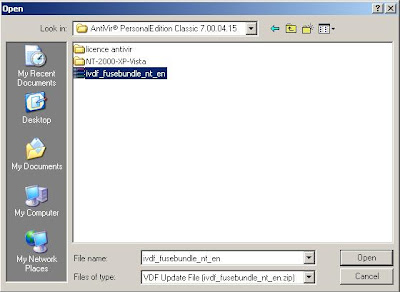
4. Wait until a message appears that has been successful update
5. To download the installer Antivir, click here
Thursday, 12 February 2009
Update manually AVG Antivirus Free Edition 8
Update antivirus AVG Free edition can be done online and its can be updated manually.
To update AVG Antivirus Free Edition manually, do the following procedures:
1. Download the latest AVG update defenition, (ektension .bin)
To download the update use the link below
http://free.avg.com/download-update
2. Run AVG Antivirus Free Edition

3. On the Tools menu click "update from directory", select the file update AVG Antivirus Free Edition, click the OK button, wait until the update is completed.
 4. Wait until a message appears that the update has been successfully
5. To download the installer AVG Antivirus, click here
Subscribe to:
Posts (Atom)