Add url Baidu (submit blog to Baidu and increase visitors from china). Baidu is China's largest search engine. In China, Baidu is more popular when compared to google. Based on data from Alexa rank, looks Baidu ranked first in China, and ranked 6th in the world .. In China google.com.hk only ranked 5th. Baidu website description details can be seen below:
About Baidu.com (baidu.com): The leading Chinese language search engine, Provides a simple and reliable "search experience, strong in Chinese language and multi-media content Including MP3 music and movies, the first to offer WAP and PDA-based mobile search in China.
Baidu.com is Ranked # 6 in the world According to the three-month Alexa traffic rankings. The time spent in a typical visit to the site is approximately eleven minutes, with 29 seconds spent on EACH page view. Compared with the internet averages, the site appeals more to Asians; Also its visitors tend to consist of women under the age of 35 WHO browse from work and school and have no postgraduate education. The site is in the "" category of websites. Baidu.com has been online for more Than eleven years.
Info alexa web search engine Baidu could dilhat here Top Sites in China
By registering your blog to our website chance Baidu then indexed by Baidu, even if it could appear on SERP position 10 is likely to increase traffic from china.
To register or add url blog on Baidu following procedure:
1. Open the registration page, you can click here add url Baidu
If you do not understand the Chinese language can use google translate
Enter the url of the blog, captcha code and click the submit button
Showing posts with label SEO (Search Engine Optimization). Show all posts
Showing posts with label SEO (Search Engine Optimization). Show all posts
Thursday, 18 November 2010

Sunday, 14 November 2010
Add url to Yandex (submit blog to Yandex) to increase visitors from Russia
Add url to Yandex (submit blog to Yandex) to increase visitors from Russia. Yandex is the largest search engine in Russia, based on data from Alexa, especially from Russian Internet users look Yandex more popular than Google, Yahoo, Bing. Yandex is in position 1 while google.ru is at position 4. can be found here Top Sites in Russia
According the data from Alexa 85% Yandex users come from Russia, alexa ranking order of 1 in Russia, and ranked 26 in the world. Yandex alexa Details can be found below:
About Яндекс (yandex.ru): Поиск информации в интернете с учетом русской морфологии, возможность регионального уточнения. Параллельный поиск по новостям, картинкам, товарам, блогам, адресам организаций.
Яндекс's global three-month Alexa traffic rank is 26. Relative to the overall population of Internet users, the site's users are disproportionately low-income, and They tend to be men under the age of 35 WHO have postgraduate Educations and browse from home. Approximately 3% of visits to the site are Referred by search engines, and this site has been online since 1997. We estimate That 85% of visitors to Yandex.ru come from Russia, Nowhere it has attained a traffic rank of 1.
One way to increase blog traffic is by trying to attract visitors from russia. By default robot Yandex will crawl and index your website / blog, but to more quickly indexed we can do it manually submit url to yandex.ru.
If interested in applying to the search engine Yandex blog can do the following procedure:
1. Go to page add url Yandex
2. Will open the page as below
Enter your blog URL, type the captcha code that appears at random, and then click the Add button on the right url is the url text box
According the data from Alexa 85% Yandex users come from Russia, alexa ranking order of 1 in Russia, and ranked 26 in the world. Yandex alexa Details can be found below:
About Яндекс (yandex.ru): Поиск информации в интернете с учетом русской морфологии, возможность регионального уточнения. Параллельный поиск по новостям, картинкам, товарам, блогам, адресам организаций.
Яндекс's global three-month Alexa traffic rank is 26. Relative to the overall population of Internet users, the site's users are disproportionately low-income, and They tend to be men under the age of 35 WHO have postgraduate Educations and browse from home. Approximately 3% of visits to the site are Referred by search engines, and this site has been online since 1997. We estimate That 85% of visitors to Yandex.ru come from Russia, Nowhere it has attained a traffic rank of 1.
One way to increase blog traffic is by trying to attract visitors from russia. By default robot Yandex will crawl and index your website / blog, but to more quickly indexed we can do it manually submit url to yandex.ru.
If interested in applying to the search engine Yandex blog can do the following procedure:
1. Go to page add url Yandex
2. Will open the page as below
Enter your blog URL, type the captcha code that appears at random, and then click the Add button on the right url is the url text box
Saturday, 17 July 2010
Tuesday, 22 December 2009
Alexa rank
Alexa ranks sites based on tracking information of users of its Alexa Toolbar for Internet Explorer and from integrated sidebars in Mozilla and Netscape.
Once installed, the toolbar collects data on browsing behavior which is transmitted to the website where it is stored and analyzed and is the basis for the company's web traffic reporting.
There is some controversy over how representative Alexa's user base is of typical Internet behavior. If Alexa's user base is a fair statistical sample of the Internet user population . Alexa's ranking should be quite accurate. In reality, not much is known about the sample and possible sampling biases. Alexa itself notes several examples. A known source of bias is the self-selecting, opt-in nature of Alexa traffic tracking software installation, but the significance of this bias on rankings is not reported.
Once installed, the toolbar collects data on browsing behavior which is transmitted to the website where it is stored and analyzed and is the basis for the company's web traffic reporting.
There is some controversy over how representative Alexa's user base is of typical Internet behavior. If Alexa's user base is a fair statistical sample of the Internet user population . Alexa's ranking should be quite accurate. In reality, not much is known about the sample and possible sampling biases. Alexa itself notes several examples. A known source of bias is the self-selecting, opt-in nature of Alexa traffic tracking software installation, but the significance of this bias on rankings is not reported.
Monday, 16 November 2009
How to verify the blog (website) to google sitemap
Some facilities Google Webmaster tools you can use for free is Google Analityc and Google Sitemaps. Google Sitemaps will be useful to assist Googlebot in knowing (browse) all the pages on your site, making it easier for Google to index all the pages on your site.
To register a blog to google sitemap click here google webmaster tools
(note: you can blog on the list after you lists googlesitemap blog on google and indexed by google)
1. enter your password and user name google account (similar to google your blog account)
2. Once successfully logged in, your dashboard will display a Google sitemap page
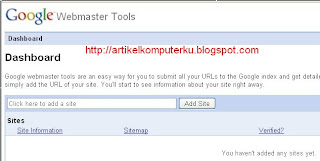
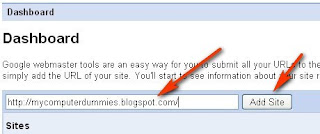
3. Enter your blog url: http://nameyourblog.com
for example: http://mycomputerdummies.blogspot.com/
Click the Add Site
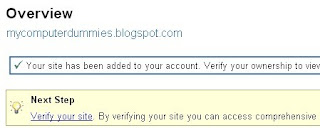
4. Click Verify your site
5. The following page will appear
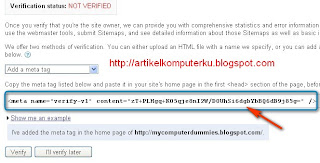
In the "choose verification method" select "Add a meta tag"
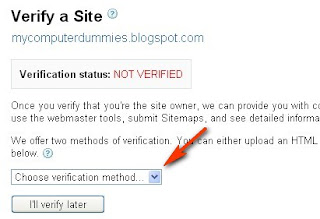
6. Will appear script meta tag (see red arrow)
You copy the script into your blog template
7. Log in to your blog account
Select the Dashboard -> layout -> Edit html
Check Expand widget templates
Enter the google sitemap script after head and before the tittle blog (google recommended)
<head>
install google sitemap sccript here
<title><data:blog.pageTitle/></title>
result script like below:
<head>
<meta content='RBpPtBYjErQbhxgO3N+uY4IkmSeDchwXpuk3CH+i1II=' name='verify-v1'/>
<title><data:blog.pageTitle/></title>
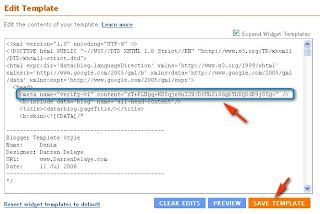
Click the Save Template
8. Return to page google sitemap (see step 6)
Click the Verify button
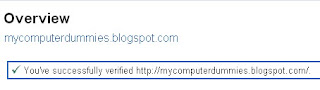
If successful it will appear the following success message.
To register a blog to google sitemap click here google webmaster tools
(note: you can blog on the list after you lists googlesitemap blog on google and indexed by google)
1. enter your password and user name google account (similar to google your blog account)
2. Once successfully logged in, your dashboard will display a Google sitemap page

3. Enter your blog url: http://nameyourblog.com
for example: http://mycomputerdummies.blogspot.com/
Click the Add Site

4. Click Verify your site

5. The following page will appear
In the "choose verification method" select "Add a meta tag"

6. Will appear script meta tag (see red arrow)
You copy the script into your blog template

7. Log in to your blog account
Select the Dashboard -> layout -> Edit html
Check Expand widget templates
Enter the google sitemap script after head and before the tittle blog (google recommended)
<head>
install google sitemap sccript here
<title><data:blog.pageTitle/></title>
result script like below:
<head>
<meta content='RBpPtBYjErQbhxgO3N+uY4IkmSeDchwXpuk3CH+i1II=' name='verify-v1'/>
<title><data:blog.pageTitle/></title>

Click the Save Template
8. Return to page google sitemap (see step 6)
Click the Verify button
If successful it will appear the following success message.

How to remove pages (posts) which is indexed google
There may be among your friends who may ever delete a post in your blog. If the page or post that you delete not yet google indexed,you are lucky because there are no problems with search engines. But the problem would be more at risk if you delete the posts that had been indexed by google. If google has indexed, automatically posting links is stored in the google cache, so that when google did crawl of your blog will cause google to find broken links (will affect the decrease pagerank / pagerank even tend to ride hard). But this is only one parameter that is used in making google rank a blog, in addition to inbound links, outbound links, traffic, age of blogs, health of the link, etc.
To have your blog look healthy when visited by a robot google, then you are a good idea to check the links that you accidentally delete.
The following procedure to remove the links that have indexed google:
1. Check the pages Google has indexed by typing site: in google search namablog, can be found here how to check google indexed pages, or can check on the google webmaster tools in the diagnostic.
2. Log in to google webmaster tools google webmaster tools
Note, I think your blog has been verified by google,
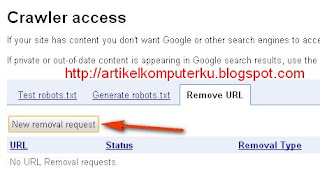
3. after login, select crawler access
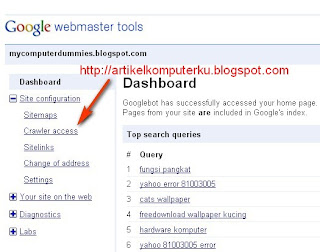
4. Select "New removal request"
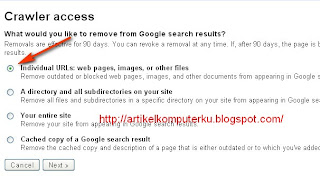
5. Select individual urls: web pages, images or other files
Choose next
6. Enter links page will be removed
Select Add, then Submit request removal
(maximum of 100 links)
Wait until Google completes an elimination, usually (maximum 90 days) the link will disappear from the google search.

To have your blog look healthy when visited by a robot google, then you are a good idea to check the links that you accidentally delete.
The following procedure to remove the links that have indexed google:
1. Check the pages Google has indexed by typing site: in google search namablog, can be found here how to check google indexed pages, or can check on the google webmaster tools in the diagnostic.
2. Log in to google webmaster tools google webmaster tools
Note, I think your blog has been verified by google,
3. after login, select crawler access

4. Select "New removal request"

5. Select individual urls: web pages, images or other files
Choose next

6. Enter links page will be removed
Select Add, then Submit request removal
(maximum of 100 links)
Wait until Google completes an elimination, usually (maximum 90 days) the link will disappear from the google search.

Sunday, 15 November 2009
Link Exchange
Haloo friends who want to exchange links, let's exchange links to increase rank our blog. Your link will I put on this page.
This is mylink sources code.
You can enter this link in the gadget html / Javascript in the sidebar of your blog. Or to a post page like the pages of my link exchange, making it easier for us to visit the site each other friends. You only need to copy my link and then paste it into the gadget html / javascript), or to a post page like this my page.
My Link
Name : My Computer Dummies
Url : http://mycomputerdummies.blogspot.com
Thanks.
MyFriends Banner


MyFriends List
1. Artikel Komputer
2. Komputer SEO
5. Computer prices online
7. Music online corner
8.
9.
10. link tea
11.
12.
13. http://blogs.cipinet.com/ Blogs Director (blognya terhapus)
14. Direktori Indonesia - Indonesian free listing directory, SEO friendly free link directory, a comprehensive directory of Indonesian website.
15. BizHat.com Directory
16. SoMuch.com
Popular Internet Links directory focused mainly on Computers and Programming but also covers humor, entertainment, news, Medical, Real Estate and Property, Travel, Timeshare and Cruises, Fitness and Bodybuilding, Music and Graphics. Links are updated daily.
17. Free blog directory
Free blog directory listing at goblog.Search4i.com.
18. http://www.anastix.net/- Direktori Website Indonesia - This Account Has Been Suspended
19. business 4 sale surreyThousands of businesses for sale, Buy or sell a business at RightBiz. Connecting business buyers and sellers!
20. Add website, Submit Link, URL, website to our free seo friendly web directory
21. Webmaster Link Exchange - Free Web Link Exchange Directory. Where Webmasters go to trade links with other webmasters
22. Beli Toyota
23. http://secretformulaaccess.blogspot.com/
24.
25.
28. Baca Manga
29. Bebas Berbagi
30. http://www.bengawanjaya.com/ - Reciprocal Link NOT Found
31. Arul
This is mylink sources code.
<a href="http://mycomputerdummies.blogspot.com">My Computer Dummies</a>
You can enter this link in the gadget html / Javascript in the sidebar of your blog. Or to a post page like the pages of my link exchange, making it easier for us to visit the site each other friends. You only need to copy my link and then paste it into the gadget html / javascript), or to a post page like this my page.
My Link
Name : My Computer Dummies
Url : http://mycomputerdummies.blogspot.com
Thanks.
BANNER DAN LINK SAHABAT
MyFriends Banner
MyFriends List
1. Artikel Komputer
2. Komputer SEO
5. Computer prices online
7. Music online corner
8.
9.
10. link tea
11.
12.
13. http://blogs.cipinet.com/ Blogs Director (blognya terhapus)
14. Direktori Indonesia - Indonesian free listing directory, SEO friendly free link directory, a comprehensive directory of Indonesian website.
15. BizHat.com Directory
16. SoMuch.com
Popular Internet Links directory focused mainly on Computers and Programming but also covers humor, entertainment, news, Medical, Real Estate and Property, Travel, Timeshare and Cruises, Fitness and Bodybuilding, Music and Graphics. Links are updated daily.
17. Free blog directory
Free blog directory listing at goblog.Search4i.com.
18. http://www.anastix.net/- Direktori Website Indonesia - This Account Has Been Suspended
19. business 4 sale surreyThousands of businesses for sale, Buy or sell a business at RightBiz. Connecting business buyers and sellers!
20. Add website, Submit Link, URL, website to our free seo friendly web directory
21. Webmaster Link Exchange - Free Web Link Exchange Directory. Where Webmasters go to trade links with other webmasters
22. Beli Toyota
23. http://secretformulaaccess.blogspot.com/
24.
25.
28. Baca Manga
29. Bebas Berbagi
30. http://www.bengawanjaya.com/ - Reciprocal Link NOT Found
31. Arul
Friday, 13 November 2009
Submit blog (web) to main of search engines manually
In addition to the website to register or list of blogs to search engines automatically, you can also register your blog manually to search engines. If using the automatic method, you simply press a button then the service provider submit to the tens of search engines that will perform the execution, but we are not sure whether we have really blog on search engines submit to what we want.
If the manual you need to make every effort to enter the link / url of your blog to one search engine, but we can be sure that our blog is already listed on search engines that we want.
from both of the above, depending on your choice, personally I prefer the list of blogs to search engines manually. For friends who want to register of blog to search engine can manually use the following link:
1. http://www.google.com/addurl/?continue=/addurl
2. http://siteexplorer.search.yahoo.com/submit
3. http://www.bing.com/docs/submit.aspx
4. http://www.dmoz.org
5. http://www.scrubtheweb.com/addurl.html
6. http://www.exactseek.com/add.html
7. http://searchsight.com/submit.htm
8. http://www.cuil.com/info/contact_us/feedback.php?to=crawl%20me
9. http://www.entireweb.com/free_submission/
10. http://www.lii.org/cs/lii/create/todo
11. http://www.webworldindex.com/
12. http://www.viesearch.com/submit.php
13. http://www.a1webdirectory.org/
14. http://www.skoobe.biz
15. http://www.linksite.net/submit.html
16. http://www.illumirate.com
17. http://www.info-listings.com/submit.php
18. http://www.directorystorm.com/
19. http://www.dramba.com
20. http://www.arakne-links.com/submit.php
21. http://www.wikidweb.com
22. http://www.linkcentre.com
23. http://www.infotiger.com/addurl.html
24. http://www.pedsters-planet.co.uk
25. http://www.ablazedirectory.com/submit.php
26. http://www.mydirectorylive.com/submit.php
27. http://www.domaining.in/submit.php
28. http://www.businessseek.biz/page.php?page=submission-policy
29. http://www.surfsafely.com/urladd.html
30. http://www.whatuseek.com/addurl-secondary.shtml
31. http://www.amray.com
32. http://www.onemilliondirectory.com
33. http://www.newwebdirectory.com
34. http://www.worldsiteindex.com
35. http://www.intelseek.com/add_url_form.asp
36. http://www.cyberwebsearch.com
37. http://www.searchwebworld.com
38. http://www.finest4.com/submit.php
39. http://search.sonicrun.com/freelisting
40. http://www.internet-web-directory.com/cgi-bin/member.cgi?action=add
41. http://www.mardox.com/addasite.php
42. http://www.thelivinglink.net/submit.php
43. http://www.01webdirectory.com
44. http://www.submit.biz
45. http://www.triplewdirectory.com/submit.php
46. http://www.wondex.com/submit.php
47. http://www.netinsert.com
48. http://www.clocktowerstudio.com/submit.php
49. http://www.cipinet.com/addurl
50. http://www.amidalla.de/add.htm
If the manual you need to make every effort to enter the link / url of your blog to one search engine, but we can be sure that our blog is already listed on search engines that we want.
from both of the above, depending on your choice, personally I prefer the list of blogs to search engines manually. For friends who want to register of blog to search engine can manually use the following link:
1. http://www.google.com/addurl/?continue=/addurl
2. http://siteexplorer.search.yahoo.com/submit
3. http://www.bing.com/docs/submit.aspx
4. http://www.dmoz.org
5. http://www.scrubtheweb.com/addurl.html
6. http://www.exactseek.com/add.html
7. http://searchsight.com/submit.htm
8. http://www.cuil.com/info/contact_us/feedback.php?to=crawl%20me
9. http://www.entireweb.com/free_submission/
10. http://www.lii.org/cs/lii/create/todo
11. http://www.webworldindex.com/
12. http://www.viesearch.com/submit.php
13. http://www.a1webdirectory.org/
14. http://www.skoobe.biz
15. http://www.linksite.net/submit.html
16. http://www.illumirate.com
17. http://www.info-listings.com/submit.php
18. http://www.directorystorm.com/
19. http://www.dramba.com
20. http://www.arakne-links.com/submit.php
21. http://www.wikidweb.com
22. http://www.linkcentre.com
23. http://www.infotiger.com/addurl.html
24. http://www.pedsters-planet.co.uk
25. http://www.ablazedirectory.com/submit.php
26. http://www.mydirectorylive.com/submit.php
27. http://www.domaining.in/submit.php
28. http://www.businessseek.biz/page.php?page=submission-policy
29. http://www.surfsafely.com/urladd.html
30. http://www.whatuseek.com/addurl-secondary.shtml
31. http://www.amray.com
32. http://www.onemilliondirectory.com
33. http://www.newwebdirectory.com
34. http://www.worldsiteindex.com
35. http://www.intelseek.com/add_url_form.asp
36. http://www.cyberwebsearch.com
37. http://www.searchwebworld.com
38. http://www.finest4.com/submit.php
39. http://search.sonicrun.com/freelisting
40. http://www.internet-web-directory.com/cgi-bin/member.cgi?action=add
41. http://www.mardox.com/addasite.php
42. http://www.thelivinglink.net/submit.php
43. http://www.01webdirectory.com
44. http://www.submit.biz
45. http://www.triplewdirectory.com/submit.php
46. http://www.wondex.com/submit.php
47. http://www.netinsert.com
48. http://www.clocktowerstudio.com/submit.php
49. http://www.cipinet.com/addurl
50. http://www.amidalla.de/add.htm
Friday, 30 October 2009
How to choose a template using CSS and XHTML Validator
Sometimes with a lot of templates that are available, we are confused choosing a good template for SEO optimization. There are several options that are usually a consideration in choosing a template that looks good and fast loading. But there are things that sometimes we forget that the google robot(search engine) sometimes cranky if found too many errors in the script your blog template. The smaller the error in the template then the template is better. but keep in mind that it is very difficult to get a template that has no errors. We suggest using a template error value below 40, and the warning is not too much.
To detect errors in the template script which will you choose to use the following facilities:
1. CSS Validator
This facility serves to detect the CSS script error
Please click here CSS Validator

2. XHTML Validator
This facility serves to detect the error XHTML script or does not meet the standards.
Please click here XHTML Validator

To detect errors in the template script which will you choose to use the following facilities:
1. CSS Validator
This facility serves to detect the CSS script error
Please click here CSS Validator

2. XHTML Validator
This facility serves to detect the error XHTML script or does not meet the standards.
Please click here XHTML Validator

How to find the error link in the blog or website
In doing seo optimization, one of the parameters that must be considered is the status of the link in the blog must be active (healthy), in the sense that there is a link in the blog actually refers to a page that is still active, if the link in your blog refers to a page that was deleted or to a page that is forbidden by the google robot, link on your blog is considered a dead link (link error) by google. The more dead links (broken link), the more likely you are experiencing a penalty blog from google. Increasingly difficult to raise the page rank.
You need to test / check the status of links on a regular basis, so you can minimize the error link in your blog.
There is one facility that allows you to check the status of links in your blog, please open the site link validator

You need to test / check the status of links on a regular basis, so you can minimize the error link in your blog.
There is one facility that allows you to check the status of links in your blog, please open the site link validator

Monday, 5 October 2009
Kenali dan Kunjungi Objek Wisata di Pandeglang SEO Support
This post specially created to support SEO Kenali dan Kunjungi Objek Wisata di Pandeglang
Kenali dan Kunjungi Objek Wisata di Pandeglang is a SEO contest with a natural nuances and local culture. Precisely in Banten province which is also the most western province of Java. This contest runs from August 17, 2009 at 00:00 pm until 17 November at 24.00 pm.
A. Nature Tourism
1. TOURISM AREAS TANJUNG LESUNG (as the name might coast headland that forms the shape of his cape-shaped mortar).
2. TOURISM AREAS Pantai Bama, while taking a break There could also be an ascetic who knows his SEO knowledge to be more Identify and Object Object Check in Pandeglang
3. CIPUTIH BEACH,
4. CIKOROMOY baths, according to his name this place so bath
5. CURUG GENDANG, a waterfall tour
6. Permandian air panas belerang CISOLONG (Sulfur hot spring) , this shower bath in hot water and cooked (boiled) eggs, so remember Ciater.
7. MOUNTAIN REEF TOUR, this is what excited you must be strong to climb if they want to travel there.
8.PEMANDIAN ALAM CITAMAN
Is a natural bathing place in the Foot of Mount PULOSARI. Surrounding scenery is very beautiful. Located in District JIPUT.
9.TAMAN nasional Ujung Kulon
This is what needs to be conserved, because there is the big shy of Rhino Ujung Kulon Pandeglang
B. ARTS and Culture Tourism
There are Rampak Bedug, Pading pading, martial art, Debus, and others may also ondel-ondel.
Kenali dan Kunjungi Objek Wisata di Pandeglang is a SEO contest with a natural nuances and local culture. Precisely in Banten province which is also the most western province of Java. This contest runs from August 17, 2009 at 00:00 pm until 17 November at 24.00 pm.
A. Nature Tourism
1. TOURISM AREAS TANJUNG LESUNG (as the name might coast headland that forms the shape of his cape-shaped mortar).
2. TOURISM AREAS Pantai Bama, while taking a break There could also be an ascetic who knows his SEO knowledge to be more Identify and Object Object Check in Pandeglang
3. CIPUTIH BEACH,
4. CIKOROMOY baths, according to his name this place so bath
5. CURUG GENDANG, a waterfall tour
6. Permandian air panas belerang CISOLONG (Sulfur hot spring) , this shower bath in hot water and cooked (boiled) eggs, so remember Ciater.
7. MOUNTAIN REEF TOUR, this is what excited you must be strong to climb if they want to travel there.
8.PEMANDIAN ALAM CITAMAN
Is a natural bathing place in the Foot of Mount PULOSARI. Surrounding scenery is very beautiful. Located in District JIPUT.
9.TAMAN nasional Ujung Kulon
This is what needs to be conserved, because there is the big shy of Rhino Ujung Kulon Pandeglang
B. ARTS and Culture Tourism
There are Rampak Bedug, Pading pading, martial art, Debus, and others may also ondel-ondel.
Friday, 25 September 2009
About Google and the "Keywords" Meta Tag
Google does not use the "keywords" meta tag in its web search ranking. Google's Matt Cutts explains this in a Webmaster Central video. This is not breaking news, by any means, but there are a lot of people out there that still put a lot of stock into this.
In fact, Cutts mentions that people have sued each other for meta tag keyword theft, when really this is just a waste of everybody's time, because they don't even play a role in the ranking of sites on Google. Have you been under the impression that the keywords meta tag was important to ranking in Google? Comment here.
"About a decade ago, search engines judged pages only on the content of web pages, not any so-called "off-page" factors such as the links pointing to a web page," says Cutts. "In those days, keyword meta tags quickly became an area where someone could stuff often-irrelevant keywords without typical visitors ever seeing those keywords. Because the keywords meta tag was so often abused, many years ago Google began disregarding the keywords meta tag."
Just because Google ignores the "keywords" meta tag, that doesn't mean it ignores all meta tags. In fact, there are several that the search engine definitely uses. For one, Google sometimes uses the "description" meta tag as the text for search results snippets. But even in then, the "description" meta tag isn't used to influence ranking.
Google also recognizes the "google," "robots," "verify-v1," "content type," and "refresh" meta tags. Information about how Google understands these can be found at this page in the Webmaster Tools help center.
"It's possible that Google could use this information in the future, but it's unlikely," Cutts says of the "keywords" meta tag. "Google has ignored the keywords meta tag for years and currently we see no need to change that policy."
So the moral of the story is, if a competitor is jacking your keywords, and using them in their own "keywords" meta tag, this will have no effect whatsoever in how they rank in Google when compared to your site. Cutts says other search engines might use the information, but Google doesn't.
Google does note that its enterprise Search Appliance has the ability to match meta tags, but this is of course separate from Google web search.
As I have said before, these videos and other tips Google frequently gives out are worth paying attention to for any webmaster looking to rank well. Whether they're talking about duplicate content, meta tags, or paid links, they're all aimed at telling webmasters how it is, and clarifying any misconceptions to the contrary. Whether you agree with Google's methods in all cases or not, the tips are for your benefit.
Like it or not, Google controls what people find on the web when they search. The company's huge market share is just something that is. There is always the possibility that could change in the future, but at this point, it looks like webmasters are not going to be able to ignore Google for a long time, if they hope to be found on the web by searchers
In fact, Cutts mentions that people have sued each other for meta tag keyword theft, when really this is just a waste of everybody's time, because they don't even play a role in the ranking of sites on Google. Have you been under the impression that the keywords meta tag was important to ranking in Google? Comment here.
"About a decade ago, search engines judged pages only on the content of web pages, not any so-called "off-page" factors such as the links pointing to a web page," says Cutts. "In those days, keyword meta tags quickly became an area where someone could stuff often-irrelevant keywords without typical visitors ever seeing those keywords. Because the keywords meta tag was so often abused, many years ago Google began disregarding the keywords meta tag."
Just because Google ignores the "keywords" meta tag, that doesn't mean it ignores all meta tags. In fact, there are several that the search engine definitely uses. For one, Google sometimes uses the "description" meta tag as the text for search results snippets. But even in then, the "description" meta tag isn't used to influence ranking.
Google also recognizes the "google," "robots," "verify-v1," "content type," and "refresh" meta tags. Information about how Google understands these can be found at this page in the Webmaster Tools help center.
"It's possible that Google could use this information in the future, but it's unlikely," Cutts says of the "keywords" meta tag. "Google has ignored the keywords meta tag for years and currently we see no need to change that policy."
So the moral of the story is, if a competitor is jacking your keywords, and using them in their own "keywords" meta tag, this will have no effect whatsoever in how they rank in Google when compared to your site. Cutts says other search engines might use the information, but Google doesn't.
Google does note that its enterprise Search Appliance has the ability to match meta tags, but this is of course separate from Google web search.
As I have said before, these videos and other tips Google frequently gives out are worth paying attention to for any webmaster looking to rank well. Whether they're talking about duplicate content, meta tags, or paid links, they're all aimed at telling webmasters how it is, and clarifying any misconceptions to the contrary. Whether you agree with Google's methods in all cases or not, the tips are for your benefit.
Like it or not, Google controls what people find on the web when they search. The company's huge market share is just something that is. There is always the possibility that could change in the future, but at this point, it looks like webmasters are not going to be able to ignore Google for a long time, if they hope to be found on the web by searchers
Tuesday, 1 September 2009
Domain name of Google Search engine
Search engine Google has a lot of domain names in the world, almost in every country have google own domain name.
The following list of Domain names Google in Various Countries:
USA = www.google.com
Afghanistan = www.google.com.af
American Samoa = www.google.as
Anguilla = www.google.off.ai
Antigua and Barbuda = www.google.com.ag
Argentina = www.google.com.ar
Armenia = www.google.am
Australia = www.google.com.au
Austria = www.google.at
Azerbaijan = www.google.az
Bahrain = www.google.com.bh
Bangladesh = www.google.com.bd
Belgium = www.google.be
Belize = www.google.com.bz
Bolivia = www.google.com.bo
Bosnia and Herzegovina = www.google.ba
Botswana = www.google.co.bw
Brazil = www.google.com.br
British Virgin Islands = www.google.vg
Bulgaria = www.google.bg
Burundi = www.google.bi
Canada = www.google.ca
Chile = www.google.cl
China = www.google.cn
Colombia = www.google.com.co
Congo, Democratic Republic of the = www.google.cd
Congo, Republic of the = www.google.cg
Cook Islands = www.google.co.ck
Costa Rica = www.google.co.cr
Croatia = www.google.hr
Cuba = www.google.com.cu
Czech Republic = www.google.cz
Cote dCase Ivoire = www.google.ci
Denmark = www.google.dk
Djibouti = www.google.dj
Dominica = www.google.dm
Dominican Republic = www.google.com.do
Ecuador = www.google.com.ec
Egypt = www.google.com.eg
El Salvador = www.google.com.sv
Estonia = www.google.ee
Ethiopia = www.google.com.et
Fiji = www.google.com.fj
Finland = www.google.fi
France = www.google.fr
Gambia = www.google.gm
Germany = www.google.de
Gibraltar = www.google.com.gi
Greece = www.google.com.gr
Greenland = www.google.gl
Guatemala = www.google.com.gt
Guernsey = www.google.gg
Haiti = www.google.ht
Honduras = www.google.hn
Hong Kong = www.google.com.hk
Hungary = www.google.hu
Iceland = www.google.is
India = www.google.co.in
Indonesia = www.google.co.id
Ireland = www.google.ie
Isle of Man = www.google.co.im
Israel = www.google.co.il
Italy = www.google.it
Jamaica = www.google.com.im
Japan = www.google.co.jp
Jersey = www.google.co.je
Jordan = www.google.jo
Kazakhstan = www.google.kz
Kenya = www.google.co.ke
Kyrgyzstan = www.google.kg
Latvia = www.google.lv
Lesotho = www.google.co.ls
Libya = www.google.co.ly
Liechtenstein = www.google.li
Lithuani = www.google.lt
Luxembourg = www.google.lu
Malawi = www.google.mw
Malaysia = www.google.com.my
Malta = www.google.com.mt
Mauritius = www.google.mu
Mexico = www.google.com.mx
Micronesia = www.google.fm
Mongolia = www.google.mn
Montserrat = www.google.ms
Morocco = www.google.co.ma
Namibia = www.google.com.na
Nepal = www.google.com.np
Netherlands = www.google.nl
New Zealand = www.google.co.nz
Nicaragua = www.google.com.ni
Norfolk Island = www.google.com.nf
Norway = www.google.no
Oman = www.google.com.om
Pakistan = www.google.com.pk
Panama = www.google.com.pa
Paraguay = www.google.com.py
Peru = www.google.com.pe
Philippines = www.google.com.ph
Pitcairn = www.google.com.pn
Poland = www.google.pl
Portugal = www.google.pt
Puerto Rico = www.google.com.pr
Qatar = www.google.com.qa
Romania = www.google.ro
Russia = www.google.ru
Rwanda = www.google.rw
Saint Helena = www.google.sh
San Marino = www.google.sm
Saudi Arabia = www.google.com.sa
Senegal = www.google.sn
Seychelles = www.google.sc
Singapore = www.google.com.sg
Slovakia = www.google.sk
Slovenia = www.google.si
South Africa = www.google.co.za
South Korea = www.google.co.kr
Spain = www.google.es
Sri Lanka = www.google.lk
St.Vincent and the Grenadines = www.google.com.vc
Sweden = www.google.se
Switzerland = www.google.ch
Taiwan = www.google.com.tw
Tajikistan = www.google.com.tj
Thailand = www.google.co.th
The Bahamas = www.google.bs
Tonga = www.google.to
Trinidad and Tobago = www.google.tt
Turkey = www.google.com.tr
Turkmenistan = www.google.tm
U.S. Virgin Islands = www.google.co.vi
Uganda = www.google.co.ug
Ukraine = www.google.com.ua
United Arab Emirates = www.google.ae
United Kingdom = www.google.co.uk
Uruguay = www.google.com.uy
Uzbekistan = www.google.co.uz
Venezuela = www.google.co.ve
Vietnam = www.google.com.vn
Zambia = www.google.co.zm
The following list of Domain names Google in Various Countries:
USA = www.google.com
Afghanistan = www.google.com.af
American Samoa = www.google.as
Anguilla = www.google.off.ai
Antigua and Barbuda = www.google.com.ag
Argentina = www.google.com.ar
Armenia = www.google.am
Australia = www.google.com.au
Austria = www.google.at
Azerbaijan = www.google.az
Bahrain = www.google.com.bh
Bangladesh = www.google.com.bd
Belgium = www.google.be
Belize = www.google.com.bz
Bolivia = www.google.com.bo
Bosnia and Herzegovina = www.google.ba
Botswana = www.google.co.bw
Brazil = www.google.com.br
British Virgin Islands = www.google.vg
Bulgaria = www.google.bg
Burundi = www.google.bi
Canada = www.google.ca
Chile = www.google.cl
China = www.google.cn
Colombia = www.google.com.co
Congo, Democratic Republic of the = www.google.cd
Congo, Republic of the = www.google.cg
Cook Islands = www.google.co.ck
Costa Rica = www.google.co.cr
Croatia = www.google.hr
Cuba = www.google.com.cu
Czech Republic = www.google.cz
Cote dCase Ivoire = www.google.ci
Denmark = www.google.dk
Djibouti = www.google.dj
Dominica = www.google.dm
Dominican Republic = www.google.com.do
Ecuador = www.google.com.ec
Egypt = www.google.com.eg
El Salvador = www.google.com.sv
Estonia = www.google.ee
Ethiopia = www.google.com.et
Fiji = www.google.com.fj
Finland = www.google.fi
France = www.google.fr
Gambia = www.google.gm
Germany = www.google.de
Gibraltar = www.google.com.gi
Greece = www.google.com.gr
Greenland = www.google.gl
Guatemala = www.google.com.gt
Guernsey = www.google.gg
Haiti = www.google.ht
Honduras = www.google.hn
Hong Kong = www.google.com.hk
Hungary = www.google.hu
Iceland = www.google.is
India = www.google.co.in
Indonesia = www.google.co.id
Ireland = www.google.ie
Isle of Man = www.google.co.im
Israel = www.google.co.il
Italy = www.google.it
Jamaica = www.google.com.im
Japan = www.google.co.jp
Jersey = www.google.co.je
Jordan = www.google.jo
Kazakhstan = www.google.kz
Kenya = www.google.co.ke
Kyrgyzstan = www.google.kg
Latvia = www.google.lv
Lesotho = www.google.co.ls
Libya = www.google.co.ly
Liechtenstein = www.google.li
Lithuani = www.google.lt
Luxembourg = www.google.lu
Malawi = www.google.mw
Malaysia = www.google.com.my
Malta = www.google.com.mt
Mauritius = www.google.mu
Mexico = www.google.com.mx
Micronesia = www.google.fm
Mongolia = www.google.mn
Montserrat = www.google.ms
Morocco = www.google.co.ma
Namibia = www.google.com.na
Nepal = www.google.com.np
Netherlands = www.google.nl
New Zealand = www.google.co.nz
Nicaragua = www.google.com.ni
Norfolk Island = www.google.com.nf
Norway = www.google.no
Oman = www.google.com.om
Pakistan = www.google.com.pk
Panama = www.google.com.pa
Paraguay = www.google.com.py
Peru = www.google.com.pe
Philippines = www.google.com.ph
Pitcairn = www.google.com.pn
Poland = www.google.pl
Portugal = www.google.pt
Puerto Rico = www.google.com.pr
Qatar = www.google.com.qa
Romania = www.google.ro
Russia = www.google.ru
Rwanda = www.google.rw
Saint Helena = www.google.sh
San Marino = www.google.sm
Saudi Arabia = www.google.com.sa
Senegal = www.google.sn
Seychelles = www.google.sc
Singapore = www.google.com.sg
Slovakia = www.google.sk
Slovenia = www.google.si
South Africa = www.google.co.za
South Korea = www.google.co.kr
Spain = www.google.es
Sri Lanka = www.google.lk
St.Vincent and the Grenadines = www.google.com.vc
Sweden = www.google.se
Switzerland = www.google.ch
Taiwan = www.google.com.tw
Tajikistan = www.google.com.tj
Thailand = www.google.co.th
The Bahamas = www.google.bs
Tonga = www.google.to
Trinidad and Tobago = www.google.tt
Turkey = www.google.com.tr
Turkmenistan = www.google.tm
U.S. Virgin Islands = www.google.co.vi
Uganda = www.google.co.ug
Ukraine = www.google.com.ua
United Arab Emirates = www.google.ae
United Kingdom = www.google.co.uk
Uruguay = www.google.com.uy
Uzbekistan = www.google.co.uz
Venezuela = www.google.co.ve
Vietnam = www.google.com.vn
Zambia = www.google.co.zm
Tuesday, 23 June 2009
Free Directory Websites
List of 1.000 Free Directory Websites (Url/Page rank)
Page rank from 4 to 9
www.dmoz.org 9
www.lii.org/ 8
www.somuch.com 6
www.skoobe.biz/ 6
www.netinsert.com 6
www.jayde.com 6
www.info-listings.com 6
www.gimpsy.com 6
www.geniusfind.com/ 6
www.ezilon.com 6
www.exactseek.com 6
www.clickey.com 6
www.canlinks.net 6
www.buzzle.com 6
www.businessseek.biz 6
www.abilogic.com 6
www.123kidzarea.com 6
bdcconcepts.com/directory/ 6
www.epooch.com 6
www.search4i.com 6
www.busybits.com/ 6
www.zensearch.com/ 6
www.dramba.com 6
www.zeezo.com 5
www.yeandi.com 5
www.worldsiteindex.com 5
www.websavvy.cc 5
www.ultisearch.co.uk 5
www.surfsafely.com 5
www.spheri.com 5
www.sitesondisplay.com 5
www.searchtheweb.com 5
www.poddys.com 5
www.pedsters-planet.co.uk 5
www.mostpopularsites.net 5
www.massivelinks.com 5
www.linksmatch.com 5
www.linkcentre.com 5
www.itzalist.com 5
www.infotiger.com 5
www.infoclicks.net 5
www.infignos.com 5
www.illumirate.com 5
www.greatnexus.com/directory/ 5
www.fx1.co.uk 5
www.findhound.com 5
www.eurofind.biz 5
www.consultant-directory.com 5
www.cluboo.com 5
www.best-websites.net 5
www.batteryweb.com/ 5
www.amray.com 5
www.allthewebsites.org 5
www.aardvarkbusiness.net 5
directory.ticketretriever.com 5
www.webworldindex.com/ 5
www.sirpac.org/ 5
www.freshtv.com/ 5
directory.cipinet.com/ 5
www.re-quest.net/ 5
www.earthstation9.com 5
www.resourcehelp.com/ 5
invo.info/ 5
www.e-sygoing.com/ 5
www.pegasusdirectory.com/ 5
www.prolinkdirectory.com/ 5
www.strictlycss.com 5
www.mygreencorner.com/ 5
www.domaining.in/ 5
www.clarib.com/ 5
www.web-central.info/ 5
www.eliteweb.cc/ 5
search.able2know.com/ 5
www.seo-sources.com/ 5
www.linkspub.com/ 5
www.ablazedirectory.com/ 5
www.sirpac.org/ 5
www.gainweb.org/ 5
www.microbicides2004.org/ 5
www.liquidn.com/ 5
http://www.dpdough.net/5
www.internet-web-directory.com/ 5
www.odp.in 5
www.pegasusdirectory.com 5
www.plentylinks.com 5
linkcentre.com 5
www.wikidweb.com 5
www.wura.co.uk 5
www.tsection.com 5
www.zunchdirectory.com 5
www.submission4u.com 5
www.xland.info 4
www.whplanet.com 4
www.wholesalepimp.com 4
www.web-central.info 4
www.wamchu.com 4
www.verticaldirectories.com 4
www.velendi.com 4
www.uudir.com 4
www.themedirectory.net/ 4
www.software-pointers.com 4
www.skypemedia.com 4
www.simpledir.com 4
www.shophomebased.com/ 4
www.sharedirectory.com 4
www.sgtsearch.com 4
www.searchtwentyfour.com 4
www.resourcehelp.com 4
www.ranked1.net 4
www.pharos-search.com 4
www.onemission.com 4
www.nintra.com/directory/index.pl 4
www.network-room.com 4
www.lybot.com 4
www.linkop.com 4
www.lf.cellsina.com/ 4
www.jimac.co.uk 4
www.iqair.us/_directory.html 4
www.iconcave.com/partners 4
www.hrent.com/_directory.html 4
www.hotlinksdirectory.com 4
www.geeksonsteroids.com/directory 4
www.gdotz.com 4
www.fxdir.com 4
www.foundya.co.uk 4
www.findwhatwhere.info 4
www.dmole.org 4
www.dir-submission.com 4
www.directorystorm.com 4
www.directory-online.net/ 4
www.directory-link.info 4
www.directory-free.com 4
www.directorydelux.com 4
www.directory.ldmstudio.com 4
www.dir.snn.gr 4
www.dhundo.com 4
www.bys.net/ 4
www.blisswolff.com/directory 4
www.asparaclub.com/ 4
www.anywhere.ca 4
www.allfreethings.com 4
www.addyoursitefreesubmit.com 4
www.accessweb.ws 4
www.777media.com 4
thebusinessdir.com 4
directory.xperts.ro 4
directory.ingwar.eu.org 4
www.best-net-sites.com/ 4
www.best-sites.co.uk/ 4
www.norlinks.com 4
www.fatinfo.com 4
www.link-directory.us 4
www.premierdirectory.org 4
www.free-website-directory.com 4
www.seoservices.info/ 4
www.iextreme.info 4
www.diroot.com/ 4
www.free-submission-directory.com 4
www.turnpike.net/directory.html 4
www.network-room.com/links/ 4
www.searchlook.com/ 4
www.network-room.com/links/ 4
www.sgtsearch.com/ 4
www.webdirectory.co.in/ 4
www.mavicanet.com/ 4
www.01webdirectory.com/ 4
www.2space.net/ 4
www.beedirectory.com/ 4
www.directorystorm.com/ 4
www.directory-link.info 4
www.onamission.com/ 4
www.wikidweb.com/ 4
www.directorydelux.com/ 4
www.dir-submission.com/ 4
www.free-website-directory.com/ 4
www.a1dir.com/ 4
admart.ca/ 4
www.maxpromo.com/ 4
www.tbwd.org 4
www.alistsites.com 4
www.alistdirectory.com 4
poozl.com/ 4
www.viesearch.com/ 4
www.urltube.com/ 4
www.theseoking.com/ 4
www.blackdhalia.com 4
www.zunchdirectory.com/ 4
www.samsdirectory.com/ 4
d911.net/ 4
www.viesearch.com 4
www.forage.in/ 4
www.a2adir.info/ 4
www.directory.wtslink.com/ 4
www.smifee.com/ 4
www.yvir.com/ 4
www.linkgrinder.com 4
www.zorkk.com/ 4
www.abydir.com/ 4
www.allsitessorted.com 4
www.free-top.net/ 4
www.purple-links.info 4
www.dotrig.com/ 4
www.seocourt.com 4
www.nightbreezeinc.com/ 4
www.hopunloppu.fi/directory/ 4
www.plentylinks.com/ 4
www.seocourt.com/ 4
www.inteligentd.com 4
www.directory.pkdesign.sk/ 4
www.desilinkdirectory.com/ 4
www.gotowebguide.com/ 4
lookup.ws/directory/ 4
www.piseries.com/ 4
www.fxdir.com/ 4
www.friendly-links.com/ 4
www.submit-url.org/ 4
www.freelinkdir.com/ 4
www.nwkk.com/ 4
www.tradeIn.biz/ 4
www.dynn.org 4
www.gmdir.com/ 4
directory.askbee.net/ 4
www.crazyleafdesign.com/webdirectory/ 4
www.ttdb.net/ 4
www.wd1r.com/ 4
www.dirlist.net/ 4
www.creativeagency.eu/ 4
www.free-submission-directory.com/ 4
www.geeez.com/ 4
www.websitespromotiondirectory.com/ 4
www.webolink.com/ 4
www.automotoforum.cz 4
jtob.com/ 4
www.tx6.org/ 4
www.3windex.com/ 4
www.ctapda.com/ 4
www.123hitlinks.info/ 4
www.playground3.com/ 4
www.expressvisits.com/ 4
www.directoryworm.com/ 4
www.fat64.net/ 4
www.wonder-directory.com/ 4
www.mygreencorner.com 4
www.eliteweb.cc/directory 4
www.the-free-directory.co.uk 4
www.directoryvault.com 4
www.dir2u.com 4
www.prolinkdirectory.com 4
www.nicobyte.co.uk 4
links.scrabblestop.com 4
www.anyapex.com 4
www.2space.net 4
www.domain-link-exchange.com 4
www.projectultra.com 4
www.explodesearch.com 4
www.apexoo.com/directory 4
www.klottra.com 4
onebestlink.com 4
www.abcsubmission.com 4
www.fsobc.org 4
blue.daffodil.uk.com/directory 4
www.arakne-links.com 4
directory.ezweb-tools.com 4
fastpaths.com 4
www.ilushkin.com 4
www.kingoftheweb.net/directory 4
www.mercury-directory.info 4
websitespromotiondirectory.com 4
www.urlshack.com 4
www.littlewebdirectory.com/links.asp 4
www.topsearchengineranking.us 4
www.samsdirectory.com 4
www.paranabis.com 4
www.z7u.net 4
www.findsites.net 4
peksman.com 4
www.a1webdirectory.com 4
www.pblake.com 4
www.bukitbesi.net/webdirectory 4
www.onemilliondirectory.com 4
www.26portal.com 4
www.mrktcity.com 4
www.cinelocation.com 4
References: http://perpustakaanumum.blogspot.com
Page rank from 4 to 9
www.dmoz.org 9
www.lii.org/ 8
www.somuch.com 6
www.skoobe.biz/ 6
www.netinsert.com 6
www.jayde.com 6
www.info-listings.com 6
www.gimpsy.com 6
www.geniusfind.com/ 6
www.ezilon.com 6
www.exactseek.com 6
www.clickey.com 6
www.canlinks.net 6
www.buzzle.com 6
www.businessseek.biz 6
www.abilogic.com 6
www.123kidzarea.com 6
bdcconcepts.com/directory/ 6
www.epooch.com 6
www.search4i.com 6
www.busybits.com/ 6
www.zensearch.com/ 6
www.dramba.com 6
www.zeezo.com 5
www.yeandi.com 5
www.worldsiteindex.com 5
www.websavvy.cc 5
www.ultisearch.co.uk 5
www.surfsafely.com 5
www.spheri.com 5
www.sitesondisplay.com 5
www.searchtheweb.com 5
www.poddys.com 5
www.pedsters-planet.co.uk 5
www.mostpopularsites.net 5
www.massivelinks.com 5
www.linksmatch.com 5
www.linkcentre.com 5
www.itzalist.com 5
www.infotiger.com 5
www.infoclicks.net 5
www.infignos.com 5
www.illumirate.com 5
www.greatnexus.com/directory/ 5
www.fx1.co.uk 5
www.findhound.com 5
www.eurofind.biz 5
www.consultant-directory.com 5
www.cluboo.com 5
www.best-websites.net 5
www.batteryweb.com/ 5
www.amray.com 5
www.allthewebsites.org 5
www.aardvarkbusiness.net 5
directory.ticketretriever.com 5
www.webworldindex.com/ 5
www.sirpac.org/ 5
www.freshtv.com/ 5
directory.cipinet.com/ 5
www.re-quest.net/ 5
www.earthstation9.com 5
www.resourcehelp.com/ 5
invo.info/ 5
www.e-sygoing.com/ 5
www.pegasusdirectory.com/ 5
www.prolinkdirectory.com/ 5
www.strictlycss.com 5
www.mygreencorner.com/ 5
www.domaining.in/ 5
www.clarib.com/ 5
www.web-central.info/ 5
www.eliteweb.cc/ 5
search.able2know.com/ 5
www.seo-sources.com/ 5
www.linkspub.com/ 5
www.ablazedirectory.com/ 5
www.sirpac.org/ 5
www.gainweb.org/ 5
www.microbicides2004.org/ 5
www.liquidn.com/ 5
http://www.dpdough.net/5
www.internet-web-directory.com/ 5
www.odp.in 5
www.pegasusdirectory.com 5
www.plentylinks.com 5
linkcentre.com 5
www.wikidweb.com 5
www.wura.co.uk 5
www.tsection.com 5
www.zunchdirectory.com 5
www.submission4u.com 5
www.xland.info 4
www.whplanet.com 4
www.wholesalepimp.com 4
www.web-central.info 4
www.wamchu.com 4
www.verticaldirectories.com 4
www.velendi.com 4
www.uudir.com 4
www.themedirectory.net/ 4
www.software-pointers.com 4
www.skypemedia.com 4
www.simpledir.com 4
www.shophomebased.com/ 4
www.sharedirectory.com 4
www.sgtsearch.com 4
www.searchtwentyfour.com 4
www.resourcehelp.com 4
www.ranked1.net 4
www.pharos-search.com 4
www.onemission.com 4
www.nintra.com/directory/index.pl 4
www.network-room.com 4
www.lybot.com 4
www.linkop.com 4
www.lf.cellsina.com/ 4
www.jimac.co.uk 4
www.iqair.us/_directory.html 4
www.iconcave.com/partners 4
www.hrent.com/_directory.html 4
www.hotlinksdirectory.com 4
www.geeksonsteroids.com/directory 4
www.gdotz.com 4
www.fxdir.com 4
www.foundya.co.uk 4
www.findwhatwhere.info 4
www.dmole.org 4
www.dir-submission.com 4
www.directorystorm.com 4
www.directory-online.net/ 4
www.directory-link.info 4
www.directory-free.com 4
www.directorydelux.com 4
www.directory.ldmstudio.com 4
www.dir.snn.gr 4
www.dhundo.com 4
www.bys.net/ 4
www.blisswolff.com/directory 4
www.asparaclub.com/ 4
www.anywhere.ca 4
www.allfreethings.com 4
www.addyoursitefreesubmit.com 4
www.accessweb.ws 4
www.777media.com 4
thebusinessdir.com 4
directory.xperts.ro 4
directory.ingwar.eu.org 4
www.best-net-sites.com/ 4
www.best-sites.co.uk/ 4
www.norlinks.com 4
www.fatinfo.com 4
www.link-directory.us 4
www.premierdirectory.org 4
www.free-website-directory.com 4
www.seoservices.info/ 4
www.iextreme.info 4
www.diroot.com/ 4
www.free-submission-directory.com 4
www.turnpike.net/directory.html 4
www.network-room.com/links/ 4
www.searchlook.com/ 4
www.network-room.com/links/ 4
www.sgtsearch.com/ 4
www.webdirectory.co.in/ 4
www.mavicanet.com/ 4
www.01webdirectory.com/ 4
www.2space.net/ 4
www.beedirectory.com/ 4
www.directorystorm.com/ 4
www.directory-link.info 4
www.onamission.com/ 4
www.wikidweb.com/ 4
www.directorydelux.com/ 4
www.dir-submission.com/ 4
www.free-website-directory.com/ 4
www.a1dir.com/ 4
admart.ca/ 4
www.maxpromo.com/ 4
www.tbwd.org 4
www.alistsites.com 4
www.alistdirectory.com 4
poozl.com/ 4
www.viesearch.com/ 4
www.urltube.com/ 4
www.theseoking.com/ 4
www.blackdhalia.com 4
www.zunchdirectory.com/ 4
www.samsdirectory.com/ 4
d911.net/ 4
www.viesearch.com 4
www.forage.in/ 4
www.a2adir.info/ 4
www.directory.wtslink.com/ 4
www.smifee.com/ 4
www.yvir.com/ 4
www.linkgrinder.com 4
www.zorkk.com/ 4
www.abydir.com/ 4
www.allsitessorted.com 4
www.free-top.net/ 4
www.purple-links.info 4
www.dotrig.com/ 4
www.seocourt.com 4
www.nightbreezeinc.com/ 4
www.hopunloppu.fi/directory/ 4
www.plentylinks.com/ 4
www.seocourt.com/ 4
www.inteligentd.com 4
www.directory.pkdesign.sk/ 4
www.desilinkdirectory.com/ 4
www.gotowebguide.com/ 4
lookup.ws/directory/ 4
www.piseries.com/ 4
www.fxdir.com/ 4
www.friendly-links.com/ 4
www.submit-url.org/ 4
www.freelinkdir.com/ 4
www.nwkk.com/ 4
www.tradeIn.biz/ 4
www.dynn.org 4
www.gmdir.com/ 4
directory.askbee.net/ 4
www.crazyleafdesign.com/webdirectory/ 4
www.ttdb.net/ 4
www.wd1r.com/ 4
www.dirlist.net/ 4
www.creativeagency.eu/ 4
www.free-submission-directory.com/ 4
www.geeez.com/ 4
www.websitespromotiondirectory.com/ 4
www.webolink.com/ 4
www.automotoforum.cz 4
jtob.com/ 4
www.tx6.org/ 4
www.3windex.com/ 4
www.ctapda.com/ 4
www.123hitlinks.info/ 4
www.playground3.com/ 4
www.expressvisits.com/ 4
www.directoryworm.com/ 4
www.fat64.net/ 4
www.wonder-directory.com/ 4
www.mygreencorner.com 4
www.eliteweb.cc/directory 4
www.the-free-directory.co.uk 4
www.directoryvault.com 4
www.dir2u.com 4
www.prolinkdirectory.com 4
www.nicobyte.co.uk 4
links.scrabblestop.com 4
www.anyapex.com 4
www.2space.net 4
www.domain-link-exchange.com 4
www.projectultra.com 4
www.explodesearch.com 4
www.apexoo.com/directory 4
www.klottra.com 4
onebestlink.com 4
www.abcsubmission.com 4
www.fsobc.org 4
blue.daffodil.uk.com/directory 4
www.arakne-links.com 4
directory.ezweb-tools.com 4
fastpaths.com 4
www.ilushkin.com 4
www.kingoftheweb.net/directory 4
www.mercury-directory.info 4
websitespromotiondirectory.com 4
www.urlshack.com 4
www.littlewebdirectory.com/links.asp 4
www.topsearchengineranking.us 4
www.samsdirectory.com 4
www.paranabis.com 4
www.z7u.net 4
www.findsites.net 4
peksman.com 4
www.a1webdirectory.com 4
www.pblake.com 4
www.bukitbesi.net/webdirectory 4
www.onemilliondirectory.com 4
www.26portal.com 4
www.mrktcity.com 4
www.cinelocation.com 4
References: http://perpustakaanumum.blogspot.com
Sunday, 14 June 2009
How to add url (submit) blog or website to bing (microsoft)
In the year 2009 is Microsoft created a new search engine replaces search engine msn.If friends who want submit blog to search engines can direct use microsoft search engine (bing), although still in beta.
To sign up (add url) blog to msn website , use the link below
Submit blog to msn
Usage is very easy you only need to fill the captcha code, and your url blog and then click the "Submit Url" button

To sign up (add url) blog to msn website , use the link below
Submit blog to msn
Usage is very easy you only need to fill the captcha code, and your url blog and then click the "Submit Url" button

How to add url (submit) blog or website to yahoo
One way to improve Search Engine Optimation (SEO), then you need to register your blog or website to search engines, among the famous google, yahoo, msn and altavista.
General tools that work to calculate the ranking of a website's traffic using four search engines, the rest from a combination of the other search engines. So the obligation to register a website url to our search engine page, so that our website and can be identified by Search engine's index.
Benefits that we get at the time to add url yahoo then indirectly we also have to register altavista, altavista due to the yahoo search engine.
To sign up or add url (blog) to the yahoo, use the link below
http://siteexplorer.search.yahoo.com
If textboxt submit url donot appear.
Click the triangle to the left of the "Submit a Website or Webpage" so it looks like below
Type in your website url and then click the "Submit Url"

If requested your Yahoo ID and password (this is the same as the email account and password to you), then click the "Sign in"

If successful. then the page will appear as below.

Good luck.
General tools that work to calculate the ranking of a website's traffic using four search engines, the rest from a combination of the other search engines. So the obligation to register a website url to our search engine page, so that our website and can be identified by Search engine's index.
Benefits that we get at the time to add url yahoo then indirectly we also have to register altavista, altavista due to the yahoo search engine.
To sign up or add url (blog) to the yahoo, use the link below
http://siteexplorer.search.yahoo.com
If textboxt submit url donot appear.
Click the triangle to the left of the "Submit a Website or Webpage" so it looks like below
Type in your website url and then click the "Submit Url"

If requested your Yahoo ID and password (this is the same as the email account and password to you), then click the "Sign in"

If successful. then the page will appear as below.

Good luck.
Friday, 15 May 2009
About Google pagerank, Alexa rank and backlink
If you want to get higher rank specially in Google or you want to increase pagerank of your site, than you would consider these three factors to your search engine ranking or your Search Engine Optimation effort. Alexarank (alexa rank), pagerank (page rank) and backlink. Always use at least these three as parameters to evaluate your search engine optimation efforts. With at least these three factors as your search engine ranking or your Search Engine Optimation evaluation parameters than you can easily increase your pagerank. You can use this tool as a pagerank checker, alexarank checker or even as backlink checker
What is pagerank (Google Pagerank)?
Pagerank is how Google as number one search engine that most of internet users use to find anything on internet give a rank to your site. It gives ranking based on your quality backlink. So to increase pagerank of your site, you need to get as much as possible quality backlinks to your site. Quality backlink meant here is backlink from a site which its content is relevant with your content
What is alexarank (alexa rank)?
Alexarank is how Alexa give a rank to your site based on your unique visitor number. The lower the alexarank of the site so it means that the site have more unique visitors. So if you able to drive more and more traffic to your site, than you will get lower alexarank.
What is backlink?
Backlink is a link from other site to your site. A quality backlink is when your site got a link from other site which its content is relevant with your content. You can get quality backlink by submit your site to directory with relevant category or post an article or post a good comment in a blog that its content relevant to your content. Just remember that it just not the number of links but the quality of links
Accuracy of ranking by the Alexa Toolbar
There is some controversy over how representative Alexa's user base is of typical Internet behavior. If Alexa's user base is a fair statistical sample of the Internet user population (e.g., a random sample of sufficient size), Alexa's ranking should be quite accurate. In reality, not much is known about the sample and possible sampling biases. Alexa itself notes several examples. A known source of bias is the self-selecting, opt-in nature of Alexa traffic tracking software installation, but the significance of this bias on rankings is not reported
Thursday, 14 May 2009
How to add url (submit) blog or website to google
One way to improve Search Engine Optimization, then you need to register your blog or website to search engines, among the famous google, yahoo, msn and altavista.
General tools that work to calculate the ranking of a website's traffic using data from four search engines, the rest from a combination of the other search engines. So the obligation to register a website url to our search engine page, so that our website and can be identified and index by Search engine's.
To register url (blog) to google website, you can use the link below
http://www.google.com/addurl
Following page will appear, type your website url, comment (description or title of your blog), type the captcha code that appears random

Click the Add button URL,
If successful a success message will appear from google

General tools that work to calculate the ranking of a website's traffic using data from four search engines, the rest from a combination of the other search engines. So the obligation to register a website url to our search engine page, so that our website and can be identified and index by Search engine's.
To register url (blog) to google website, you can use the link below
http://www.google.com/addurl
Following page will appear, type your website url, comment (description or title of your blog), type the captcha code that appears random

Click the Add button URL,
If successful a success message will appear from google

Subscribe to:
Posts (Atom)