Amr audio file format was first made for mobile, if the amr file to be run on a computer requires a software amr player, or can also be a way to convert audio files into mp3 format to audio files can be read on the mp3 player like winamp or windows media player.
This amr converter software now widely available on the internet with a variety of character types licence from free (freeware) or paid/commercial. Free amr converter software which can be used such as:
1. Amr player plus amr converter
This software other than as a player amr file extension, can also be used to convert amr files into mp3 (amr to mp3), or to wav (amr to wav) as well as from mp3/wav to amr
The advantages of this software is able to convert amr files into mp3, mp3 files conversion result is small enough, The weaknesses of this software can only convert audio files one by one, making it quite inconvenient if you want to convert hundreds of files amr.
To use, simply add files to the list amr player amr file using the Add File button, then highlight one file in the file list, then click the AMR to MP3 button
Showing posts with label Software and applications. Show all posts
Showing posts with label Software and applications. Show all posts
Friday, 7 October 2011

Thursday, 13 January 2011
Blender free software 3D content creation
Blender is the free open source 3D content creation suite. Blender is a powerfull 3D Software for modeling - shade - animate - render - composite - interactive 3d
Blender's animations systems supports a variety of techniques and tasks, allowing the creation of complex animations.
OS Supported Platforms : Windows 2000, XP, Vista, Mac OS X (PPC and Intel), Linux (i386, SGI Irix 6.5, Sun Solaris 2.8 (sparc)
Blender's animations systems supports a variety of techniques and tasks, allowing the creation of complex animations.
OS Supported Platforms : Windows 2000, XP, Vista, Mac OS X (PPC and Intel), Linux (i386, SGI Irix 6.5, Sun Solaris 2.8 (sparc)
Tuesday, 21 December 2010
How to Fix dead pixel on LCD monitor (dead pixel repair)
How to Fix dead pixel on LCD monitor (dead pixel repair). For users of LCD monitors, sometimes comes a point at which the screen can not display color properly. Dots on the screen is sometimes the color is just the same as changing the monitor display. So often reduces the quality of the display. The point at which the broken screen usually called Dead pixel or Stuck Pixel . We can fix dead pixels is to use the software Pixel Doctor
Monday, 18 October 2010
Auto Mute software utility to make a PC silent
Auto Mute software utility to make a PC silent when it's turning on or is waking up. A solution is as easy as a pie! The sound is automatically muted when the computer is turning off or is going to sleep/suspend mode. Also there is an option to mute sound when screensaver appears. So the next system start is absolutely silent even if you forgot to turn the sound off in previous session. After restart you can unmute sound effects manually, using a shortcut combination. Moreover, you may use this keyboard shortcut to quickly switch the sound on and off when working.


Wednesday, 25 August 2010
Renaming of lot of files and folders by using Ant Renamer
Ant renamer is a free and opensource program that makes easier the renaming of lots of files and folders by using specified settings.Ant renamer will only rename the files' names, it will not modify their contents.
It supports unicode, which means that you can rename files that have characters in Greek, Japanese, Chinese, Arab or any other language. Since most of the programs have problems with such names, it can be useful to be able to rename them to Latin (basic ASCII) characters for example.
It supports unicode, which means that you can rename files that have characters in Greek, Japanese, Chinese, Arab or any other language. Since most of the programs have problems with such names, it can be useful to be able to rename them to Latin (basic ASCII) characters for example.
Thursday, 1 April 2010
Paint.NET is free image and photo editing software (freeware)
Paint.NET is free image and photo editing software for computers that run Windows. It features an intuitive and innovative user interface with support for layers, unlimited undo, special effects, and a wide variety of useful and powerful tools. An active and growing online community provides friendly help, tutorials, and plugins.
Friday, 25 December 2009
Free data compression software
This software can be freely used, copied, studied, modified, and redistributed by everyone that obtains a copy: “free software” or “open source software”. Typically, this means software which is distributed with a free software license, and whose source code is available to anyone who receives a copy of the software.
1. 7-Zip
2. ARJ
3. AdvanceCOMP
4. Ar (Unix)
5. Ark (computing)
6. Bzip2
7. DAR (Disk Archiver)
8. File Roller
9. FreeArc
10. Gzip
11. Info-ZIP
12. KGB Archiver
13. Keka
14. LZRW
15. Lempel-Ziv-Oberhumer
16. Lzop
17. P7zip
18. PAQ
19. PEA (file format)
20. PeaZip
21. Pngcrush
22. QUAD (compressor)
23. Reduced Offset Lempel Ziv
24. Rzip
25. UPX
26. The Unarchiver
27. Unrar
28. XAD (software)
29. XZ Utils
30. Xarchiver
31. Xz
32. Zlib
Sources: Wikipedia
1. 7-Zip
2. ARJ
3. AdvanceCOMP
4. Ar (Unix)
5. Ark (computing)
6. Bzip2
7. DAR (Disk Archiver)
8. File Roller
9. FreeArc
10. Gzip
11. Info-ZIP
12. KGB Archiver
13. Keka
14. LZRW
15. Lempel-Ziv-Oberhumer
16. Lzop
17. P7zip
18. PAQ
19. PEA (file format)
20. PeaZip
21. Pngcrush
22. QUAD (compressor)
23. Reduced Offset Lempel Ziv
24. Rzip
25. UPX
26. The Unarchiver
27. Unrar
28. XAD (software)
29. XZ Utils
30. Xarchiver
31. Xz
32. Zlib
Sources: Wikipedia
Saturday, 28 November 2009
Download Free video screen capture software supporting audio recording
CamStudio (Freeware/Windows) is able to record all screen and audio activity on your computer and create industry-standard AVI video files and using its built-in SWF Producer can turn those AVIs into lean, mean, bandwidth-friendly Streaming Flash videos (SWFs).
Here are just a few ways you can use this software:
* You can use it to create demonstration videos for any software program
* Or how about creating a set of videos answering your most frequently asked questions?
* You can create video tutorials for school or college class
* You can use it to record a recurring problem with your computer so you can show technical support people
* You can even use it to record new tricks and techniques you discover on your favourite software program, before you forget them
CamStudio can also add high-quality, anti-aliased (no jagged edges) screen captions to your recordings in seconds and with the unique Video Annotation feature you can even personalise your videos by including a webcam movie of yourself "picture-in-picture" over your desktop.
Lossless video codec
And if all that wasn't enough, CamStudio also comes with its own Lossless Codec that produces crystal clear results with a much smaller filesize compared with other more popular codecs, like Microsoft Video 1.
Total control over the output of your video
You can choose to use custom cursors, to record the whole screen or just a section of it and can reduce or increase the quality of the recording depending on if you want smaller videos (for emailing to people, for instance) or you can have "best quality" ones for burning onto CD/DVD.
Easy to use screen capture software
All of these features would be worthless if CamStudio wasn't easy to use ... fortunately that's not the case. CamStudio can be learned in a matter of minutes and comes with a comprehensive built-in helpfile, so if you do manage to get stuck, you can simply hit "Help" and get the answers you need.
Absolutely free software
You can download and use it completely free - yep - completely 100% free for your personal and commercial projects as CamStudio and the Codec are released under the GPL. There are no royalties or any monies to pay - although if you do use it for a commercial product, I wouldn't say no to a copy of whatever you produce.
Main features:
* 100% FREE software.
* High quality but small output file.
* Supports recording whole screen, specified area of screen, specified window.
* Supports sound recording.
* Supports recording mouse movements.
* Supports outputting to AVI and SWF
* Supports screen captions
System Requirements:
* 32-bit MS Windows (NT/2000/XP)
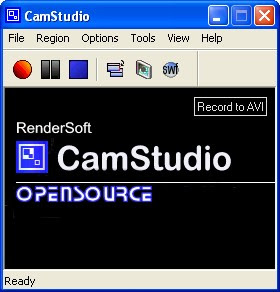
Please download here ...Screen recorder
Here are just a few ways you can use this software:
* You can use it to create demonstration videos for any software program
* Or how about creating a set of videos answering your most frequently asked questions?
* You can create video tutorials for school or college class
* You can use it to record a recurring problem with your computer so you can show technical support people
* You can even use it to record new tricks and techniques you discover on your favourite software program, before you forget them
CamStudio can also add high-quality, anti-aliased (no jagged edges) screen captions to your recordings in seconds and with the unique Video Annotation feature you can even personalise your videos by including a webcam movie of yourself "picture-in-picture" over your desktop.
Lossless video codec
And if all that wasn't enough, CamStudio also comes with its own Lossless Codec that produces crystal clear results with a much smaller filesize compared with other more popular codecs, like Microsoft Video 1.
Total control over the output of your video
You can choose to use custom cursors, to record the whole screen or just a section of it and can reduce or increase the quality of the recording depending on if you want smaller videos (for emailing to people, for instance) or you can have "best quality" ones for burning onto CD/DVD.
Easy to use screen capture software
All of these features would be worthless if CamStudio wasn't easy to use ... fortunately that's not the case. CamStudio can be learned in a matter of minutes and comes with a comprehensive built-in helpfile, so if you do manage to get stuck, you can simply hit "Help" and get the answers you need.
Absolutely free software
You can download and use it completely free - yep - completely 100% free for your personal and commercial projects as CamStudio and the Codec are released under the GPL. There are no royalties or any monies to pay - although if you do use it for a commercial product, I wouldn't say no to a copy of whatever you produce.
Main features:
* 100% FREE software.
* High quality but small output file.
* Supports recording whole screen, specified area of screen, specified window.
* Supports sound recording.
* Supports recording mouse movements.
* Supports outputting to AVI and SWF
* Supports screen captions
System Requirements:
* 32-bit MS Windows (NT/2000/XP)

Please download here ...Screen recorder
Monday, 28 September 2009
How to integrate a SATA AHCI driver in a Windows XP Setup CD
If your computer (pc / notebook) use SATA type hard drive and choose to install Windows XP Operating System, chances are when you install Windows XP can not recognize the SATA hard disk, but your hard drive can be recognized by the bios, if this happens then you must inject your computer sata drivers into a windows installer file. Usually files sata drivers already in the cd driver notebook / mainboard that you get when you buy a computer.
If the sata driver is not in cd, you can find on your computer manufacturer website, the site into the driver tab, then do browse and use keywords your computer's specifications. For notebook use the code or your notebook series:
example: (Notebook) Acer TravelMate 6291,
Description: From personal experience, some computer or notebook now there is notneed to do injection sata drivers, such as the latest type acer notebook don't need sata drivers, just need to do configuration on a hard disk interface settings in bios, if you want to install Windows XP disk then change to the interface IDE or ACHI (commontly in peripheral settings).
Software to inject sata drivers into the windows installer is nLite (a freeware software), you can download the software they will be on site: download nliteos
Once downloaded, just install nLite, if not installed on your computer usually needs to be installed windows XP service pack, ie NET Framework 2.0
can be downloaded at:
http://www.nliteos.com/download.html, or in http://www.microsoft.com/downloads http://www.microsoft.com/downloads/details.aspx?FamilyID=79bc3b77-e02c-4ad3 -aacf-a7633f706ba5 & displaylang = en
1. The next step is to start the process of injection sata drivers into the windows installer. This process should you do on a computer that has an active windows.
Copy the entire contents of the windows cd (original) into the hard disk, a directory named for example: WinXPSP2
Then run the program nLite
2. Click Next
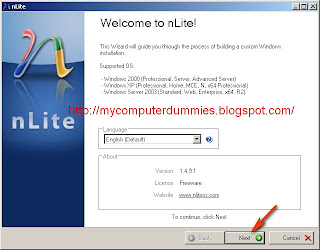
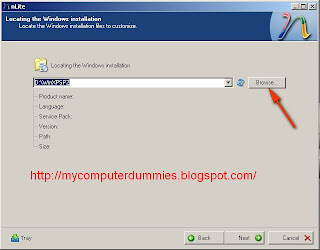
3. Click Browse, navigate to the directory that contains the windows installer file (D: WinXPSP2)
4. Click OK
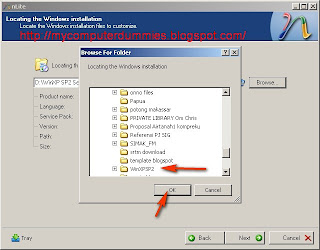
5. Click on Next, it will appear the following dialog box:
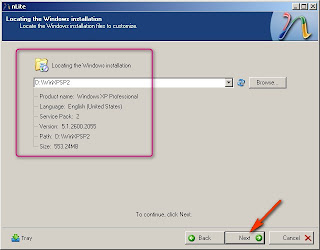
6. Click Next
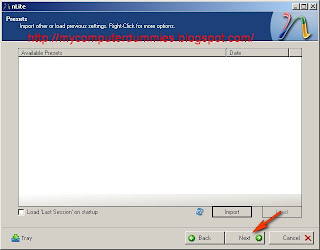
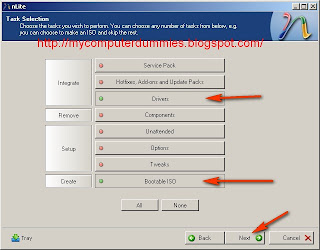
6. Click the Driver and Bootable ISO until the green button
(Driver: to integrate sata drivers ie drivers into wiindows installer, you can also include other driver)
(Bootable ISO installer for windows that you create can boot automatically when the CD has been copied )
Click the Next button
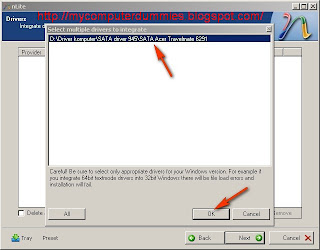
7. Select Multiple driver folder if the driver is more than one, if only one file just select a single driver
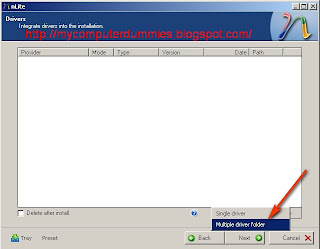
8. Find the file that contains the sata drivers on your computer, click OK
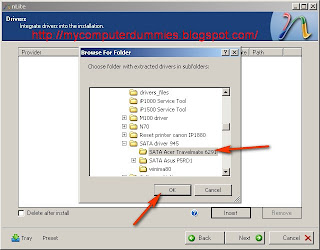
9. Select Sata driver
Click Ok
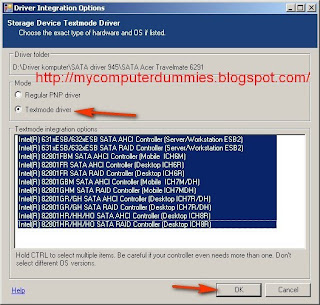
10. Select Textmode driver
Click OK
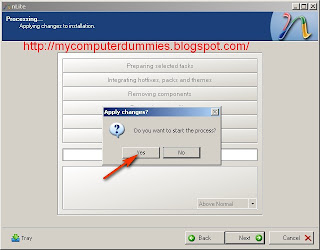
11. Click Yes in the dialog box "Do you want to start the process?"
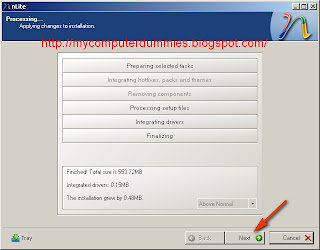
12. Click Next (you've managed to integrate sata drivers into the windows installer), then you will create an ISO file or directly burning to a CD blank
Click next
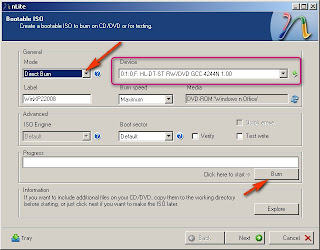
13. Now you can make a first ISOnya, or burning directly to blank CDs. Insert the CD into the CD RW Drive and press the Burn button,
Congratulations you already have a installer file of windows with sata driver integrated.
14. Next step is to go back to your first computer, run the computer and set the bios settings to boot from the CD ROM started.
15. Please you're installing windows installer file with this CD, follow instruction, if not problem then dialog confirmation of sata drive would not be asked again and sata hard drive you have can be recognized by installer Windows XP (if not yet recognized that there are sata driver files that you have not injection to windows installer, please doing the procedure 1 to 12 to fix it, select other compatible sata drive " text mode driver" )
Good luck .....!!!!!!
If the sata driver is not in cd, you can find on your computer manufacturer website, the site into the driver tab, then do browse and use keywords your computer's specifications. For notebook use the code or your notebook series:
example: (Notebook) Acer TravelMate 6291,
Description: From personal experience, some computer or notebook now there is notneed to do injection sata drivers, such as the latest type acer notebook don't need sata drivers, just need to do configuration on a hard disk interface settings in bios, if you want to install Windows XP disk then change to the interface IDE or ACHI (commontly in peripheral settings).
Software to inject sata drivers into the windows installer is nLite (a freeware software), you can download the software they will be on site: download nliteos
Once downloaded, just install nLite, if not installed on your computer usually needs to be installed windows XP service pack, ie NET Framework 2.0
can be downloaded at:
http://www.nliteos.com/download.html, or in http://www.microsoft.com/downloads http://www.microsoft.com/downloads/details.aspx?FamilyID=79bc3b77-e02c-4ad3 -aacf-a7633f706ba5 & displaylang = en
1. The next step is to start the process of injection sata drivers into the windows installer. This process should you do on a computer that has an active windows.
Copy the entire contents of the windows cd (original) into the hard disk, a directory named for example: WinXPSP2
Then run the program nLite
2. Click Next

3. Click Browse, navigate to the directory that contains the windows installer file (D: WinXPSP2)

4. Click OK

5. Click on Next, it will appear the following dialog box:

6. Click Next

6. Click the Driver and Bootable ISO until the green button
(Driver: to integrate sata drivers ie drivers into wiindows installer, you can also include other driver)
(Bootable ISO installer for windows that you create can boot automatically when the CD has been copied )
Click the Next button

7. Select Multiple driver folder if the driver is more than one, if only one file just select a single driver

8. Find the file that contains the sata drivers on your computer, click OK

9. Select Sata driver
Click Ok

10. Select Textmode driver
Click OK

11. Click Yes in the dialog box "Do you want to start the process?"

12. Click Next (you've managed to integrate sata drivers into the windows installer), then you will create an ISO file or directly burning to a CD blank
Click next

13. Now you can make a first ISOnya, or burning directly to blank CDs. Insert the CD into the CD RW Drive and press the Burn button,
Congratulations you already have a installer file of windows with sata driver integrated.

14. Next step is to go back to your first computer, run the computer and set the bios settings to boot from the CD ROM started.
15. Please you're installing windows installer file with this CD, follow instruction, if not problem then dialog confirmation of sata drive would not be asked again and sata hard drive you have can be recognized by installer Windows XP (if not yet recognized that there are sata driver files that you have not injection to windows installer, please doing the procedure 1 to 12 to fix it, select other compatible sata drive " text mode driver" )
Good luck .....!!!!!!
Using FragExt to manage file fragmentation
FragExt is a free application and shell extension set, designed to help you manage file fragmentation on FAT, FAT32 and NTFS volumes.
The set includes
* A unique file defragmenter which allows you to defragment specific files rather than an entire volume.
* A file property extension for displaying detailed information about a file's, folder's and NTFS data stream's fragmentation information.
* Windows Explorer column and info-tip extensions for displaying file fragments, extents, clusters, disk space usage and alternate data streams.
* Integration extensions for simplifying the use of the FragExt defragmenter, allowing you to select and defragment files directly from within Windows Explorer.
* Simple reporting features allowing you to save the information FragExt gathers.
* A scriptable defragmentation engine, allowing you to create your own custom utilities.
To use the application Fragext can follow the following procedure:
1. Open the application fragext
2. Select Add File
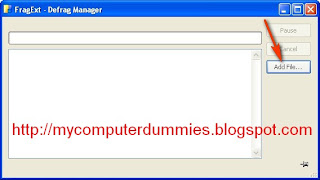
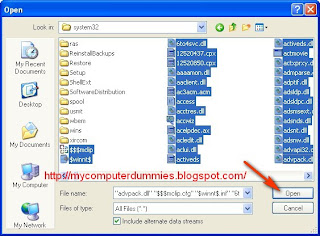
3. Files to be in defrag, in this example I use the existing file in the folder
C: / Windows/System32 /
(I just select the file without a folder)
Click the Open button
then the defrag process will start
4. When completed a message will appear Completed
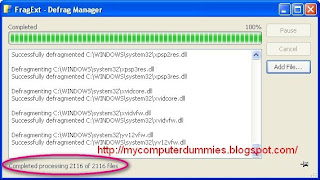
You can start defrag of other file .
The set includes
* A unique file defragmenter which allows you to defragment specific files rather than an entire volume.
* A file property extension for displaying detailed information about a file's, folder's and NTFS data stream's fragmentation information.
* Windows Explorer column and info-tip extensions for displaying file fragments, extents, clusters, disk space usage and alternate data streams.
* Integration extensions for simplifying the use of the FragExt defragmenter, allowing you to select and defragment files directly from within Windows Explorer.
* Simple reporting features allowing you to save the information FragExt gathers.
* A scriptable defragmentation engine, allowing you to create your own custom utilities.
To use the application Fragext can follow the following procedure:
1. Open the application fragext
2. Select Add File

3. Files to be in defrag, in this example I use the existing file in the folder
C: / Windows/System32 /
(I just select the file without a folder)
Click the Open button
then the defrag process will start

4. When completed a message will appear Completed

You can start defrag of other file .
Friday, 25 September 2009
Using GPU-Z to detect the VGA specification
In addition to using portable applications CPU-Z (freeware) to detect the hardware specification : processor, mainboard, and memory. You can also use GPU-Z to detect the graphics processing specifications in the VGA module installed on your computer.
GPU-Z software size approximately 460 KB. You do not need to install it. because the file is only executable files. Simply, double click the exe file GPU-Z it will automatically detect the specifications of VGA card installed in your computer
Example you can see it looks like below
GPU-Z software size approximately 460 KB. You do not need to install it. because the file is only executable files. Simply, double click the exe file GPU-Z it will automatically detect the specifications of VGA card installed in your computer
Example you can see it looks like below

Saturday, 5 September 2009
Download and convert YouTube videos and Google videos using Any Video Converter
Any Video Converter Free Version can also download and convert YouTube videos and Google videos. There is open source software to perform almost every task for video conversion. But if you are one of these windows users who are looking for an All-in-One video converting tool with easy-to-use graphical interface, Any Video Converter provides just that, allowing you to effortlessly convert video files between every format, for FREE!
Any Video Converter Free Version can convert avi, asf, mov, rm, rmvb, flv, mkv, mpg, 3gp, m4v, and vob to avi, wmv, mp4, 3gp, mpg (PAL or NTSC), MPEG-1 and MPEG-2, wmv and flv.
Any Video Converter makes batch file conversion simple. Create a batch list of any different formats and convert them all to a single selected format. The converted files will be saved to a pre-selected directory folder and the original files will remain untouched.
It can convert almost all video formats including DivX, XviD, MOV, rm, rmvb, MPEG, VOB, DVD, WMV, AVI to MPEG-I, MPEG-I, DVD NTSC , DVD PAL, Flash for Video (FLV) ,AVI Video and Customized WMV movie formats. It also supports any user defined video file formats as the output. It has an unmatchable speed and high quality.
Whether you are looking for free PSP video converter, free 3GP video converter, free FLV video converter, free MP4 converter, or free YouTube converter, Any Video Converter Free Version is the right application for you. Download the free video converter now to convert videos and experience better digital life.
Download Any Video Converter Free Version
Any Video Converter Free Version can convert avi, asf, mov, rm, rmvb, flv, mkv, mpg, 3gp, m4v, and vob to avi, wmv, mp4, 3gp, mpg (PAL or NTSC), MPEG-1 and MPEG-2, wmv and flv.
Any Video Converter makes batch file conversion simple. Create a batch list of any different formats and convert them all to a single selected format. The converted files will be saved to a pre-selected directory folder and the original files will remain untouched.
It can convert almost all video formats including DivX, XviD, MOV, rm, rmvb, MPEG, VOB, DVD, WMV, AVI to MPEG-I, MPEG-I, DVD NTSC , DVD PAL, Flash for Video (FLV) ,AVI Video and Customized WMV movie formats. It also supports any user defined video file formats as the output. It has an unmatchable speed and high quality.
Whether you are looking for free PSP video converter, free 3GP video converter, free FLV video converter, free MP4 converter, or free YouTube converter, Any Video Converter Free Version is the right application for you. Download the free video converter now to convert videos and experience better digital life.
Download Any Video Converter Free Version
Friday, 4 September 2009
How to capture video images using Power DVD
For friends who often watch a video (movie) may have often capture (screenshot / snapshot), or take pictures from the video is playing (play) by your media player. One of the video capture software is Cyberlink Power DVD (I use version 6). Cyberlink Power DVD application is sometimes a bonus when you buy a DVD /-RW Player DVVD. (I got this software when buying Asus DVD player, every brand DVD player may be different gift or complement)
To capture the video into images, can do the following procedure:
1. In the control panel, click the settings button (the hammer-screwdriver button)
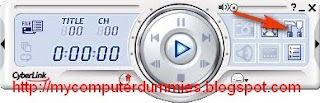
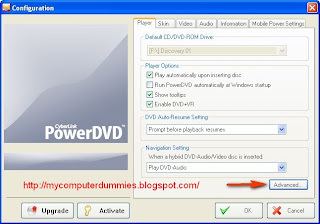
2. Select tabulation player
Click Advanced
3. Select tabulation snapshot
Select Capture to file
Note:
You can adjust the location / folder where you store files in the capture of another folder by selecting the browse button
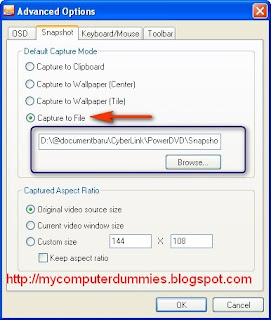
Click OK
4. Open / run your video or film. when the video is playing then the capture button (located on the control panel will be active).
Click the capture button (camera button) to capture video images, capture files will be stored in folders that you specify (see step 3)
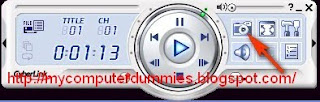
To capture the video into images, can do the following procedure:
1. In the control panel, click the settings button (the hammer-screwdriver button)

2. Select tabulation player
Click Advanced

3. Select tabulation snapshot
Select Capture to file
Note:
You can adjust the location / folder where you store files in the capture of another folder by selecting the browse button

Click OK
4. Open / run your video or film. when the video is playing then the capture button (located on the control panel will be active).
Click the capture button (camera button) to capture video images, capture files will be stored in folders that you specify (see step 3)

How to capture video images using Windows Media Player
For friends who often watch a video (movie) may have often capture (screenshot / snapshot), or take pictures from the video is playing (play) by your media player. One of the video capture software is Windows Media Player Classic. This post complements the previous postings about how to capture video in Power DVD
Note:
Windows media player classic is a little different with Windows Media Player built in Windows XP. the difference is Windows Media Player Classic is equipped with a codec that is more complete, so recognize more video and audio formats.
To download the Windows media player classic, you can download the klite codec (free). When codec is installing automatic windows media player will be installed.
After installing these codec. Open the application windows media player classic
1. Select View -> Options
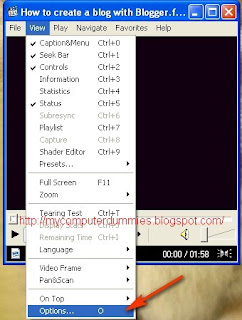
2.Select Output
Select Haali renderer
Click OK

3. Play the video / film

4. Select File -> Save Image, or directly press the Alt + I (on keyboard)

Click save

notes:
If the store image, drawing blank (no image appears), try clicking the pause button, located next to the play button. then repeat step 4.
Above cases usually occur when your computer vga not strong to render the video.
Note:
Windows media player classic is a little different with Windows Media Player built in Windows XP. the difference is Windows Media Player Classic is equipped with a codec that is more complete, so recognize more video and audio formats.
To download the Windows media player classic, you can download the klite codec (free). When codec is installing automatic windows media player will be installed.
After installing these codec. Open the application windows media player classic
1. Select View -> Options

2.Select Output
Select Haali renderer
Click OK

3. Play the video / film

4. Select File -> Save Image, or directly press the Alt + I (on keyboard)

Click save

notes:
If the store image, drawing blank (no image appears), try clicking the pause button, located next to the play button. then repeat step 4.
Above cases usually occur when your computer vga not strong to render the video.
Sunday, 31 May 2009
Screenshot image on the desktop using Irfanview
Irfanview is a free software that can be used as an image viewer . In addition, its can also be used for capture (screenshoot) display on the desktop (computer screen). The advantages this software compared to capture by using the other printscreen software is capture results that can display the cursor and mouse pointer.
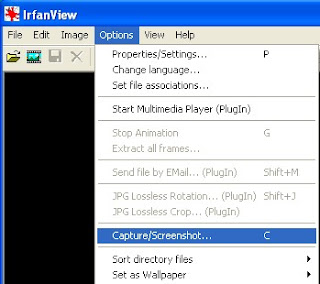
1. To start capture (record display in a computer screen), open the application irfan view.
On the menu bar select Options -> Capture / screenshots
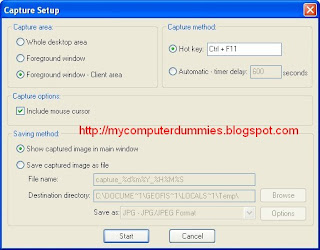
2. In the next dialog box click the Start button
3. Open an application that will capture, in this example I open the excel application
a. press the key combination Ctrl + F11
b. If successful the results will appear in capture Irfanview.
the result as below
(mouse cursor can capture clearly)
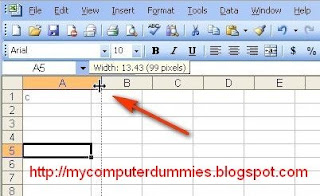
4. As a comparison, if the application use printscreen (keyboard) or fscapture software, the result as below
(mouse cursor can not capture)
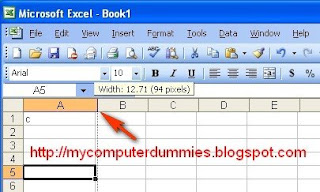
You can download irfanvew here
1. To start capture (record display in a computer screen), open the application irfan view.
On the menu bar select Options -> Capture / screenshots

2. In the next dialog box click the Start button

3. Open an application that will capture, in this example I open the excel application
a. press the key combination Ctrl + F11
b. If successful the results will appear in capture Irfanview.
the result as below
(mouse cursor can capture clearly)

4. As a comparison, if the application use printscreen (keyboard) or fscapture software, the result as below
(mouse cursor can not capture)

You can download irfanvew here
Thursday, 14 May 2009
Free Convert multimedia file FLV to 3GP, AVI, MPEG, WMV, MP3, MP4, and much more
Format Factory is a multifunctional media converter. Format Factory is a freeware software.
Provides functions below:
All to MP4/3GP/MPG/AVI/WMV/FLV/SWF.
All to MP3/WMA/AMR/OGG/AAC/WAV.
All to JPG/BMP/PNG/TIF/ICO/GIF/TGA.
Rip DVD to video file , Rip Music CD to audio file.
MP4 files support iPod/iPhone/PSP/BlackBerry format.
Supports RMVB.
Format Factory's Feature:
1 support converting all popular video,audio,picture formats to others.
2 Repair damaged video and audio file.
3 Reducing Multimedia file size.
4 Support iphone,ipod multimedia file formats.
5 Picture converting supports Zoom,Rotate/Flip,tags.
6 DVD Ripper.
7 Supports 50 languages
OS requirements: All 32 windows OS
You can download here

Provides functions below:
All to MP4/3GP/MPG/AVI/WMV/FLV/SWF.
All to MP3/WMA/AMR/OGG/AAC/WAV.
All to JPG/BMP/PNG/TIF/ICO/GIF/TGA.
Rip DVD to video file , Rip Music CD to audio file.
MP4 files support iPod/iPhone/PSP/BlackBerry format.
Supports RMVB.
Format Factory's Feature:
1 support converting all popular video,audio,picture formats to others.
2 Repair damaged video and audio file.
3 Reducing Multimedia file size.
4 Support iphone,ipod multimedia file formats.
5 Picture converting supports Zoom,Rotate/Flip,tags.
6 DVD Ripper.
7 Supports 50 languages
OS requirements: All 32 windows OS
You can download here

Monday, 13 April 2009
Convert FLV to 3GP, AVI, MPEG, WMV, MP3, MP4
May be friends have a download file (flash video files) from youtube and want to change it to 3GP format, so be on your mobile phone. Or want to change the flv format to AVI, MPEG, WMV, MP3, MP4, the free software Flash Free Flv Video Converter you can use. File Size installer about 4 MB, you can download here flv converter
Free Flash Flv Video Converter is a free software that can convert flash file (flv) to other video and audio formats such as 3GP, AVI, MPEG, WMV, MP3, MP4. Even if the software is free, but the facilities provided are complete enough, it is very easy to use and results of conversion is quite good.
Free Flash Flv Video Converter is a free software that can convert flash file (flv) to other video and audio formats such as 3GP, AVI, MPEG, WMV, MP3, MP4. Even if the software is free, but the facilities provided are complete enough, it is very easy to use and results of conversion is quite good.
To convert flv files to another video format, see the following procedures:
1. Open (activate) the application Free Flash Video Converter Flv
2. After the following display appears, click the Add button

3. Select the video file that you want to flash conversion
Example: We will not go down (Song for Gaza). Flv
Click the Open button

4. Flv file after the entry in the list (see the blue box)
In the Output file type, select the video file format you want
In this example I choose: 3GP (Mobile Phone)
Click the Convert button

5. After the conversion process is complete dialog box will appear below
Click the Yes button to view the folder where the converted file.

Subscribe to:
Posts (Atom)